Are you tired of manually switching your water pump ON and OFF? Do you want to automatically fill your overhead water tank, prevent water overflow, protect your pump from running dry, or monitor water levels directly from your smartphone?
An automatic water pump controller using Arduino, ESP32, or STM32 can help solve these problems.
Using microcontrollers, water level sensors, relay modules, and smart automation technology, you can build a water pump control system that automatically starts the pump when the water level becomes low and stops it when the tank reaches its maximum level.
More advanced systems can also provide IoT water tank monitoring, mobile app control, dry-run protection, pump scheduling, wireless communication, and automatic fault detection.
At ArduinoExpert, we have developed several related water monitoring and pump automation projects, including our Water Tank and Water Pump Automation Using ESP32, which combines a waterproof ultrasonic sensor, ESP32 microcontroller, relay module, and Blynk IoT application.
In this complete guide, you will learn:
- What an automatic water pump controller is and how it works.
- Which components are required to build a water pump automation system.
- How to make a water pump controller using Arduino Uno.
- How to develop an IoT water pump controller using ESP32.
- How to build an STM32-based automatic water level controller.
- How to connect water level sensors and relay control modules.
- How to prevent tank overflow and protect pumps from dry running.
- How to add Wi-Fi, Bluetooth, GSM, and mobile app connectivity.
- How to extend a basic water pump project into a smart monitoring or commercial automation system.
Whether you are developing a simple home water tank controller or a more advanced industrial and agricultural water pumping system, this guide will help you understand the hardware, programming, and design considerations.
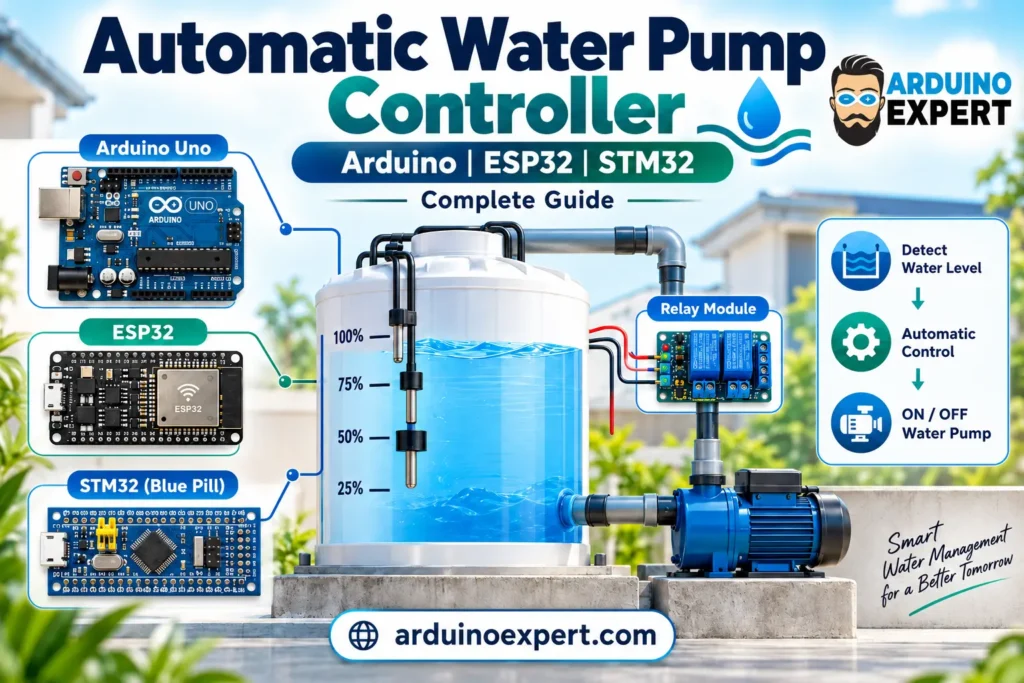
1. What Is an Automatic Water Pump Controller?
An automatic water pump controller is an electronic system that monitors water levels and controls the operation of a water pump without requiring continuous manual intervention.
Traditional water pumping systems often depend on someone physically turning the pump ON when the tank becomes empty and switching it OFF when the tank becomes full.
This approach creates several problems:
- Water tank overflow and unnecessary water wastage.
- Unexpected water shortages.
- Unnecessary pump operation.
- Potential pump damage due to dry running.
- Difficulty monitoring underground or overhead tanks.
- Dependence on manual operation.
- Limited visibility into pump faults and operating conditions.
A microcontroller-based water pump automation system addresses these issues by continuously reading sensors and deciding when the pump should operate.
How Does an Automatic Water Pump Controller Work?
A typical automatic water level controller operates according to the following sequence:
- A water level sensor continuously monitors the level inside the storage tank.
- The Arduino, ESP32, or STM32 reads the sensor information.
- When the water level falls below the configured minimum, the controller checks whether water is available at the source.
- If the required safety conditions are satisfied, the controller activates the pump-control relay or contactor.
- The pump transfers water into the tank.
- When the tank reaches its maximum level, the controller switches the pump OFF.
- If the source tank becomes empty or a fault is detected, the system stops the pump.
For example, a smart controller with continuous level measurement might use these settings:
| Tank water level | Automatic pump operation |
|---|---|
| 0–20% | Start pump if source water is available |
| 21–89% | Maintain the current pump state |
| 90–100% | Stop pump |
| Source tank empty | Stop pump and inhibit operation |
| Sensor fault detected | Stop pump and generate an alert |
This approach uses hysteresis, meaning the pump starts and stops at different water levels.
Hysteresis prevents frequent switching when the water level fluctuates around a single threshold.
For continuous water level monitoring and customized pump control, explore our Smart Water Tank Monitoring System Development Services.
2. Benefits of an Automatic Water Pump Control System
Automatic Water Tank Filling
The controller automatically fills the tank when water is low and stops when the desired level is reached.
Water Overflow Prevention
A properly installed and tested high-level sensor prevents normal pump operation from continuing once the tank reaches its selected maximum level.
For greater reliability, a separate hardwired high-high-level safety cutoff should also be considered.
Water Pump Dry-Run Protection
A source-tank water level switch can prevent pump operation when the supply tank is empty.
For more complete protection, additional flow, pressure, motor-current, or pump-controller feedback may be needed to detect loss of prime, blocked suction, or other no-water conditions.
Reduced Manual Operation
Users no longer need to continuously check tank levels or operate the pump manually.
Remote Water Pump Monitoring
An ESP32-based IoT controller can provide real-time water level information and pump status through Wi-Fi-connected mobile applications.
Flexible Automation
The same technology can be adapted for:
- Home water tanks.
- Underground-to-overhead tank pumping.
- Water storage reservoirs.
- Agricultural irrigation systems.
- Greenhouses and gardens.
- Commercial buildings.
- Industrial water management.
- Solar-powered tubewell systems.
3. Components Required to Make an Automatic Water Pump Controller
The exact components depend on the microcontroller, sensor technology, pump type, and desired automation features.
For a basic demonstration project, the following components are suitable.
| Component | Function |
|---|---|
| Arduino Uno, ESP32 DevKit, or STM32 development board | Main controller |
| Two float switches | Detect minimum and maximum destination-tank levels |
| One source-tank float switch | Detect low source-water availability |
| Compatible relay module or driver | Provide a low-voltage control output |
| Small low-voltage DC water pump | Demonstration load |
| Suitable external DC power supply | Power the pump and electronics |
| Jumper wires and connectors | Electrical connections |
| Breadboard or prototype PCB | Low-voltage circuit prototyping |
| Optional waterproof ultrasonic sensor | Continuous water level measurement |
| Optional LCD/OLED display | Local status display |
| Optional Wi-Fi/GSM/LoRa interface | Remote monitoring and control |
Important: A microcontroller GPIO pin must never power a motor directly. A real AC pump requires appropriately rated motor-control equipment, protective devices, and professional electrical installation. Ordinary hobby relay modules should not be assumed suitable for switching a mains water-pump motor.
Which Water Level Sensor Should You Use?
There are several methods of detecting water levels.
Float Switch Water Level Sensor
A float switch is a mechanical sensor that changes its electrical contact state according to the water level.
Advantages include simple interfacing, low cost, and suitability for fixed low-level or high-level detection.
For a basic automatic water pump controller, float switches are often the easiest starting point.
Ultrasonic Water Level Sensor
An ultrasonic sensor measures the distance between the sensor and the water surface.
Unlike a simple float switch, it can provide continuous water level measurement.
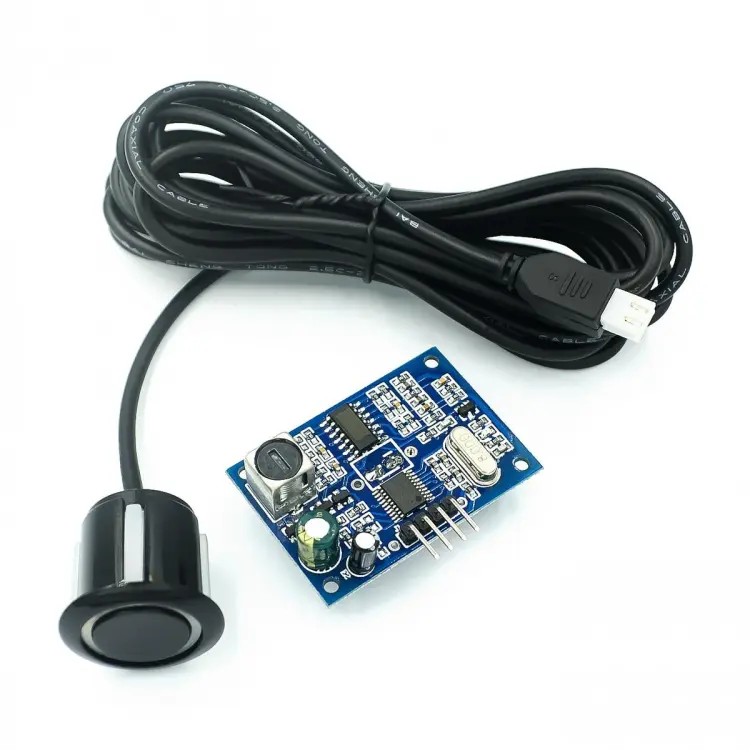
Waterproof ultrasonic sensors such as the JSN-SR04T are useful for many overhead tank monitoring projects, provided their measurement range, blind zone, mounting arrangement, and environmental limitations suit the tank.
We used this type of measurement approach in our ESP32 Water Tank and Pump Automation Project.
Hydrostatic Pressure Sensor
A hydrostatic level sensor estimates the water depth from the pressure produced by the water column.
It can be useful for deep tanks, underground reservoirs, and applications where top-mounted ultrasonic measurement is difficult.
Conductive Water Level Sensor
Conductive probes detect water through electrical conductivity.
They can be used in some basic water level controller designs, although corrosion, deposits, and water conductivity must be considered.
Comparison of Water Level Sensors
| Sensor type | Main advantage | Typical application |
|---|---|---|
| Float switch | Simple ON/OFF level detection | Basic water pump automation |
| Ultrasonic sensor | Non-contact continuous level measurement | IoT water tank monitoring |
| Pressure sensor | Suitable for various tank depths | Underground and industrial tanks |
| Conductive probe | Economical point-level detection | Basic level indicators |
| Capacitive sensor | Contact or non-contact sensing, depending on design | Specialized tank monitoring |
| Radar sensor | Advanced non-contact measurement | Industrial and demanding environments |
For this tutorial, we will first use three float switches because they allow the same basic hardware concept and control logic to work with Arduino, ESP32, and STM32.
Later, we will explain how to extend the system using ultrasonic sensors and IoT connectivity.
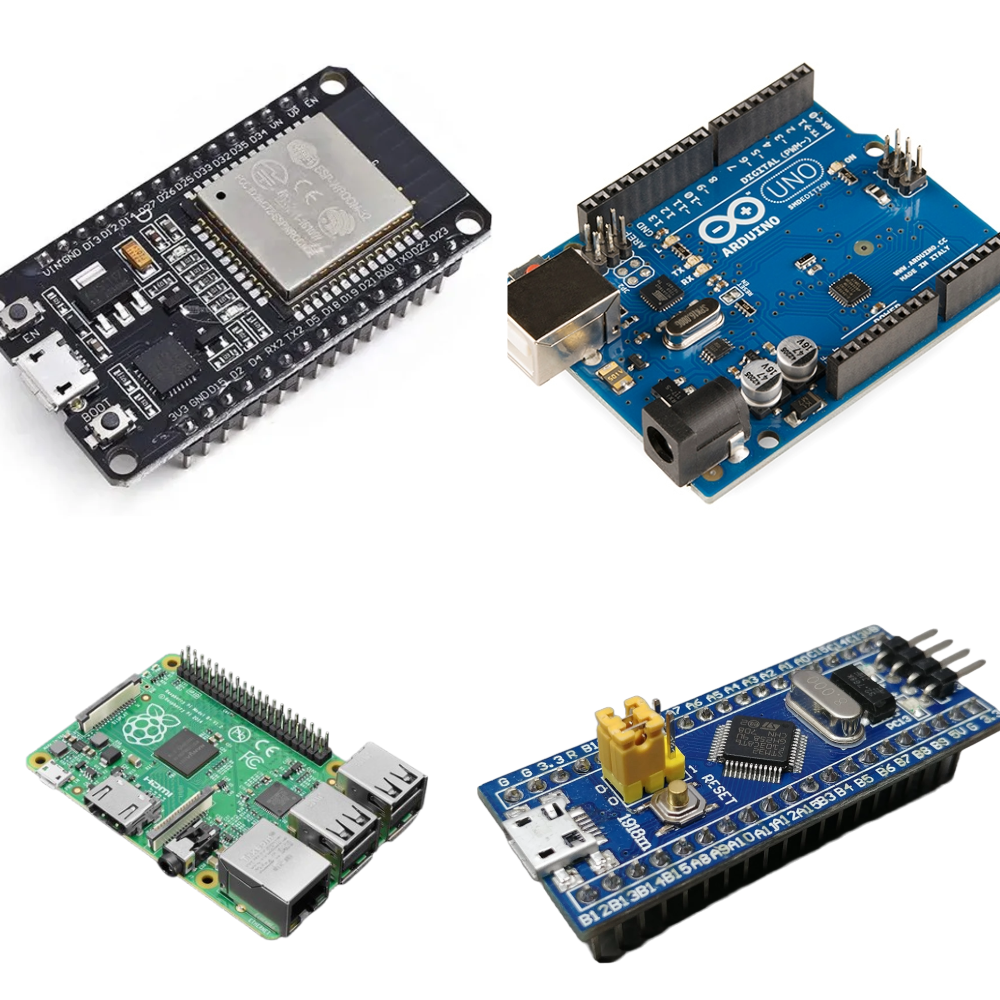
4. Arduino vs ESP32 vs STM32: Which Is Best for Water Pump Automation?
One of the first design decisions is choosing a suitable microcontroller.
Arduino, ESP32, and STM32 can all control water pumps, but they offer different capabilities.
| Feature | Arduino Uno | ESP32 | STM32 |
|---|---|---|---|
| Beginner-friendly development | Excellent | Very good | Moderate |
| Digital sensor interfacing | Yes | Yes | Yes |
| Relay or contactor control output | Yes, with interface hardware | Yes, with interface hardware | Yes, with interface hardware |
| Built-in Wi-Fi | No | Yes, on common ESP32 boards | Usually requires an external interface |
| Bluetooth | External module required | Available on many ESP32 variants | Depends on model or external hardware |
| Operating GPIO logic | Generally 5V on classic Uno | 3.3V | Generally 3.3V, with pin-specific exceptions |
| Real-time control capabilities | Basic | Good | Broad range, depending on MCU |
| IoT water tank monitoring | Requires additional hardware | Particularly suitable | Possible with connectivity hardware |
| Custom embedded product development | Possible | Very suitable | Very suitable |
When Should You Choose Arduino?
Choose Arduino Uno when you need:
- A beginner-friendly water pump automation project.
- Simple float switch control.
- Basic sensor interfacing.
- A classroom or student demonstration.
- An affordable standalone controller prototype.
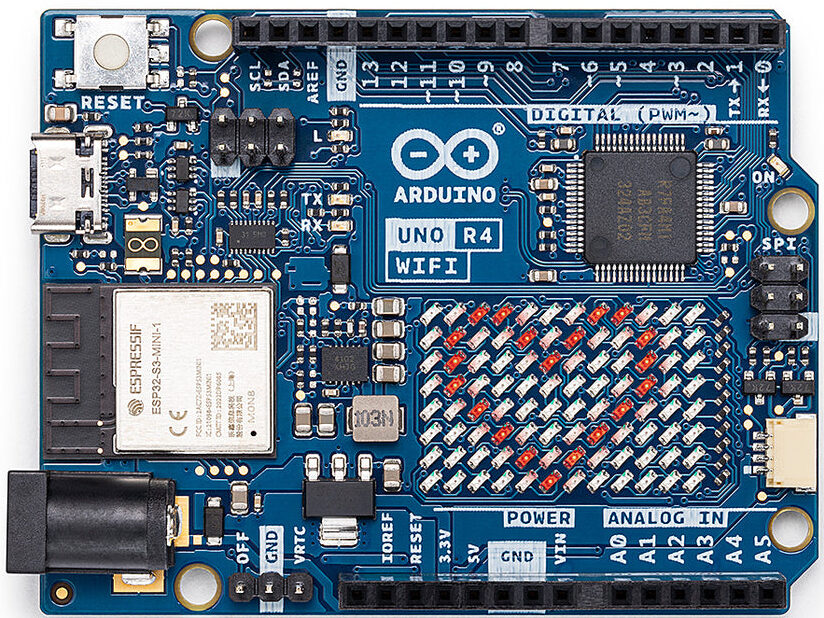
When Should You Choose ESP32?
Choose ESP32 when your project requires:
- Wi-Fi-based water pump control.
- Mobile application integration.
- Remote water level monitoring.
- Bluetooth connectivity.
- MQTT or cloud dashboards.
- Smart home or IoT water management.
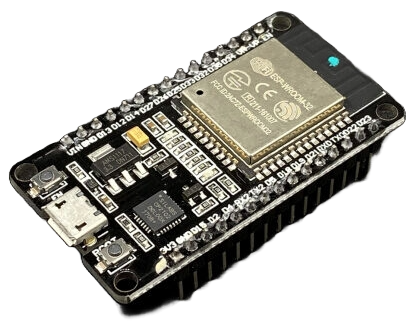
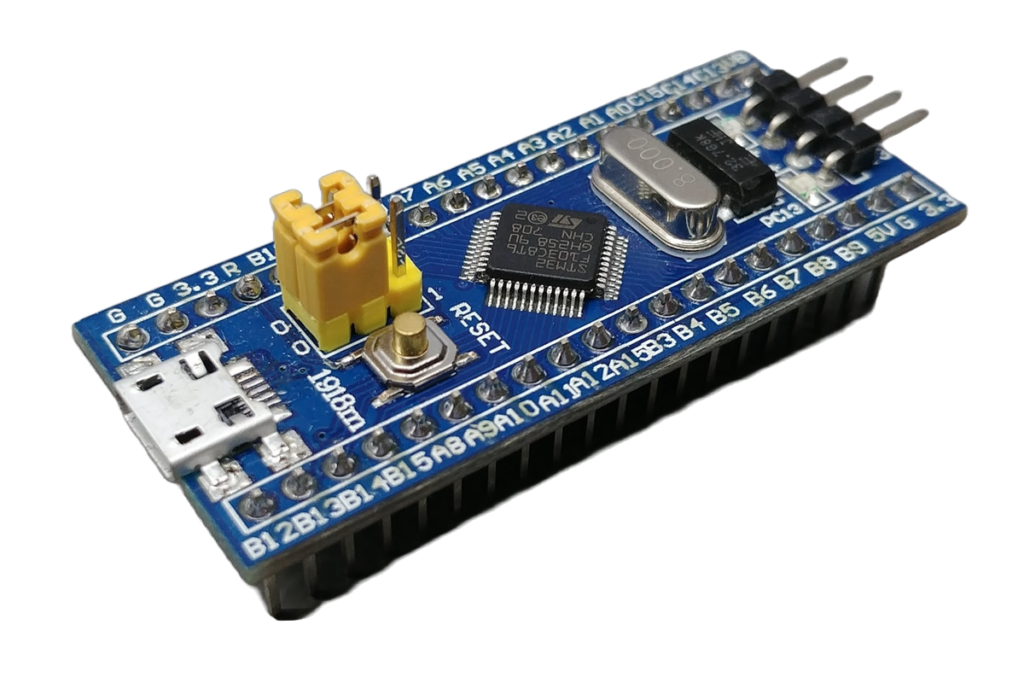
When Should You Choose STM32?
Choose STM32 when you need:
- A custom embedded water pump controller.
- More advanced peripheral and control requirements.
- Industrial communication integration.
- Structured firmware architecture.
- A production-oriented embedded design.
- Integration with motor-control or monitoring electronics.
An STM32 is not automatically more reliable than Arduino or ESP32. System reliability depends on the complete electrical design, firmware, protection circuitry, sensors, power supply, and testing.
ArduinoExpert offers STM32 Development Services for customized embedded systems, sensor integration, firmware development, and industrial automation applications.
5. Understanding the Automatic Water Pump Controller Circuit
Before programming the microcontroller, we need to understand how the hardware communicates.
Our example uses:
- One float switch at the lower level of the destination tank.
- One float switch at the upper level of the destination tank.
- One source-tank float switch.
- One pump-control relay output.
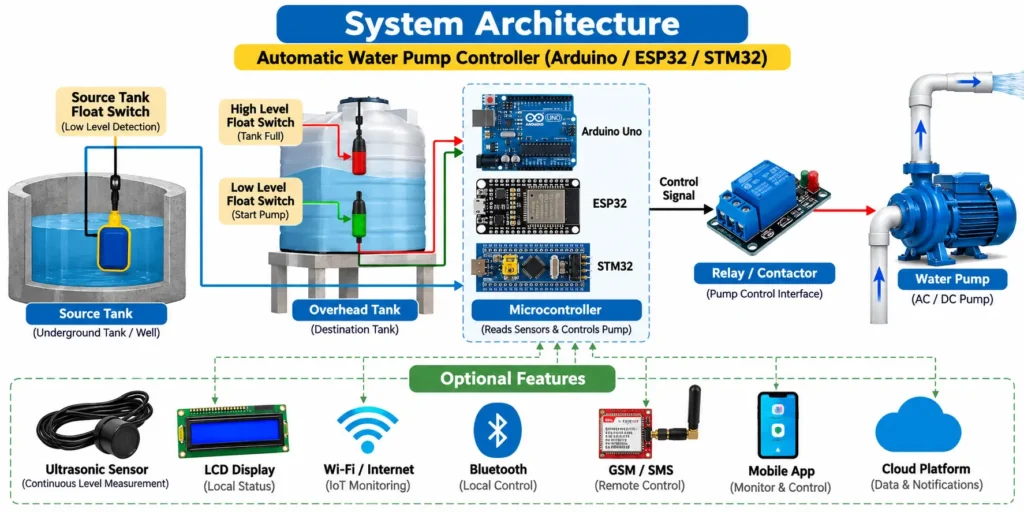
Basic System Architecture
Destination tank float switches → Microcontroller → Relay driver → Pump-control circuit
At the same time:
Source tank float switch → Microcontroller → Pump protection logic
The microcontroller decides whether the pump should run based on the available sensor information.
The relay interface converts the microcontroller’s low-power control signal into a switching command for suitable external equipment.
For larger motors, the relay typically operates a properly rated contactor or compatible motor-controller input rather than switching the motor power directly.
Sensor Positions
The lower destination-tank sensor should be installed at the minimum water level where pump refilling is required.
The upper destination-tank sensor should be installed at the selected maximum filling level.
The source-tank sensor should be positioned to identify when the water supply has fallen below the minimum permitted operating level.
The exact positions depend on tank dimensions, pump flow rate, suction arrangement, and application requirements.
6. Connecting Water Level Sensors to Arduino, ESP32, and STM32
To make the tutorial consistent, the three float switches will use digital input pins with internal pull-up resistors.
For this example, orient and verify each float switch so that:
Switch submerged in water → contact closed → digital input LOW
Switch not submerged → contact open → digital input HIGH
Some float switches can be physically reversed to change their contact behavior. Always check the actual switching orientation before using the circuit.
Arduino Uno Pin Connections
| Component | Arduino Uno pin |
|---|---|
| Destination tank lower float | D2 |
| Destination tank upper float | D3 |
| Source tank float | D4 |
| Relay control input | D8 |
| Float switch common terminals | GND |
ESP32 Pin Connections
The following connections are intended for a common ESP32 DevKit board.
| Component | ESP32 pin |
|---|---|
| Destination tank lower float | GPIO26 |
| Destination tank upper float | GPIO27 |
| Source tank float | GPIO33 |
| Relay control input | GPIO25 |
| Float switch common terminals | GND |
ESP32 pins operate at 3.3V logic levels. Use relay modules or driver circuits specifically compatible with 3.3V control signals.
Do not connect 5V sensor outputs directly to ordinary ESP32 GPIO inputs.
STM32 Pin Connections
For this example, we will use an STM32F103C8T6 Blue Pill development board.
| Component | STM32 pin |
|---|---|
| Destination tank lower float | PB12 |
| Destination tank upper float | PB13 |
| Source tank float | PB14 |
| Relay control input | PB15 |
| Float switch common terminals | GND |
Use a suitable 3.3V-compatible relay driver and verify the actual pin mappings for your STM32 board.
Electrical safety: These tables describe only the low-voltage sensor and control connections. They do not describe mains motor wiring. Do not connect AC mains to a breadboard or route pump motor current through the microcontroller. Use a separate, appropriately protected motor power circuit installed by a qualified electrician.
7. Automatic Water Pump Controller Arduino Code
The following Arduino-style program demonstrates a common control algorithm that can be compiled for:
- Arduino Uno.
- ESP32 DevKit.
- STM32F103 Blue Pill using the STM32 Arduino core.
The program automatically selects the GPIO pins according to the selected microcontroller platform.
Features of the Example Code
The program includes:
- Automatic pump ON/OFF control.
- Lower and upper water-level detection.
- Source-tank low-water cutoff.
- Basic inconsistent-sensor-state detection.
- Maximum pump runtime protection.
- Automatic filling between two defined thresholds.
Note: This is an educational prototype program for a low-voltage test setup. It is not a complete, independently validated pump safety controller. Real installations also require input debouncing, protection against sensor wiring faults, appropriately designed startup states, electrical interlocks, and independent safety devices.
Common Arduino, ESP32, and STM32 Program
// Automatic Water Pump Controller
// Arduino Uno / ESP32 / STM32
// ArduinoExpert.com
//
// Float switch convention:
// Wet = switch closed to GND = LOW
//
// Relay module convention:
// Active LOW = relay ON
//
// Educational low-voltage prototype only.

#if defined(ARDUINO_ARCH_ESP32)

const int TANK_LOW_PIN = 26;
const int TANK_HIGH_PIN = 27;
const int SOURCE_PIN = 33;
const int RELAY_PIN = 25;

#elif defined(ARDUINO_ARCH_STM32)

const int TANK_LOW_PIN = PB12;
const int TANK_HIGH_PIN = PB13;
const int SOURCE_PIN = PB14;
const int RELAY_PIN = PB15;

#else

// Arduino Uno
const int TANK_LOW_PIN = 2;
const int TANK_HIGH_PIN = 3;
const int SOURCE_PIN = 4;
const int RELAY_PIN = 8;

#endif

const int RELAY_ON = LOW;
const int RELAY_OFF = HIGH;

// Example maximum runtime: 15 minutes.
// Adjust after measuring real tank filling time.
const unsigned long MAX_RUN_MS =
    15UL * 60UL * 1000UL;

bool pumpRunning = false;
bool faultLatched = false;

unsigned long pumpStartMs = 0;

bool isWet(int pin) {
  return digitalRead(pin) == LOW;
}

void setPump(bool on) {
  pumpRunning = on;

  if (on) {
    pumpStartMs = millis();
  }

  digitalWrite(
    RELAY_PIN,
    on ? RELAY_ON : RELAY_OFF
  );
}

void setup() {

  // Set the relay output to its inactive state.
  digitalWrite(RELAY_PIN, RELAY_OFF);
  pinMode(RELAY_PIN, OUTPUT);
  setPump(false);

  pinMode(TANK_LOW_PIN, INPUT_PULLUP);
  pinMode(TANK_HIGH_PIN, INPUT_PULLUP);
  pinMode(SOURCE_PIN, INPUT_PULLUP);
}

void loop() {

  bool tankLowWet = isWet(TANK_LOW_PIN);
  bool tankHighWet = isWet(TANK_HIGH_PIN);
  bool sourceWet = isWet(SOURCE_PIN);

  // A high sensor reporting water while the
  // lower sensor is dry is inconsistent.
  if (tankHighWet && !tankLowWet) {
    faultLatched = true;
  }

  // Stop if the pump has operated too long.
  if (pumpRunning &&
      millis() - pumpStartMs >= MAX_RUN_MS) {
    faultLatched = true;
  }

  // Stop when the tank is full, the water
  // source is empty, or a fault occurs.
  if (pumpRunning &&
      (tankHighWet ||
       !sourceWet ||
       faultLatched)) {

    setPump(false);
  }

  // Start only when the destination tank
  // is below its lower threshold and
  // source water is available.
  if (!pumpRunning &&
      !faultLatched &&
      !tankLowWet &&
      !tankHighWet &&
      sourceWet) {

    setPump(true);
  }

  delay(200);
}
How the Code Works
The program reads three input signals:
TANK_LOW_PINchecks whether water has reached the lower tank sensor.TANK_HIGH_PINchecks whether water has reached the upper tank sensor.SOURCE_PINverifies that water is available in the source tank.
When both destination-tank float switches are dry, and the source tank has sufficient water, the controller turns the pump ON.
Once the pump starts, it continues filling the tank until the upper sensor becomes wet.
If source water becomes unavailable, the pump stops.
If the upper sensor detects water while the lower sensor reports dry, the program considers this an inconsistent sensor condition and activates a fault latch.
The maximum runtime limit provides an additional software cutoff if the destination tank fails to reach its upper sensor within the configured time.
A latched fault in this demonstration requires the cause to be investigated and the controller reset.
Important limitation: A disconnected upper float-switch wire can incorrectly appear dry under this wiring convention. Therefore, this example cannot guarantee overflow prevention in the presence of every wiring or sensor fault. A real installation should include an independently wired high-level cutoff that de-energizes the pump-control equipment.
Also, a source-tank float switch alone cannot detect all causes of pump dry running, such as a blocked suction pipe or failed prime.
8. How to Make an Automatic Water Pump Controller Using Arduino Uno
Arduino Uno is an excellent starting point for students, hobbyists, and beginners learning microcontroller-based automation.
Step 1: Prepare the Components
You will need:
- Arduino Uno.
- Three appropriately configured float switches.
- An Arduino-compatible relay driver module.
- A small low-voltage demonstration pump.
- Separate suitable power supplies.
- Jumper wires and a prototype board.
Step 2: Connect the Water Level Sensors
Connect the lower tank sensor to Arduino digital pin D2 and the upper tank sensor to D3.
Connect the source-tank float switch to D4.
Connect the other terminal of each switch to Arduino GND.
The program uses internal pull-up resistors, so an open switch reads HIGH and a closed switch reads LOW.
Step 3: Connect the Relay Module
Connect the relay module’s control input to Arduino D8.
Provide the relay module with the power supply and interface connections required by its manufacturer.
Use only a suitably rated low-voltage demonstration load during initial testing.
Step 4: Install Arduino IDE
Download the Arduino IDE from the official Arduino website.
Connect the Arduino Uno to your computer using a USB cable.
Select the appropriate board and COM port.
Step 5: Upload the Program
Open a new sketch in Arduino IDE.
Copy the common water pump controller program provided above.
Select Arduino Uno as the target board, verify the sketch, and upload it.
Step 6: Test the Automation
First, disconnect the physical pump load.
Test the sensor states and relay command using a suitable indicator or test instrument.
Verify these conditions:
- Destination tank low and source tank available: pump command ON.
- Destination tank reaches the upper level: pump command OFF.
- Source water becomes unavailable: pump command OFF.
- Contradictory float switch readings: fault condition.
- Maximum runtime exceeded: pump command OFF.
After confirming that the control logic works, test with a properly connected low-voltage DC pump.
Extending Arduino Pump Automation with a Touchscreen
A basic Arduino water pump controller can be expanded using a touchscreen interface, scheduling functions, and multiple output channels.
ArduinoExpert has developed an Irrigation Scheduling and Water Pumps Control System Using Touch LCD and Arduino Uno.
This project uses a Nextion touchscreen interface to manage irrigation schedules and control water pumps.
Such an approach is particularly useful when an operator requires local control without depending on internet connectivity.
9. How to Make an IoT Water Pump Controller Using ESP32
The ESP32 is an attractive choice for building a Wi-Fi water pump controller with mobile app monitoring.
Unlike a classic Arduino Uno, many ESP32 development boards include built-in Wi-Fi and Bluetooth capabilities.
This makes them suitable for smart homes, connected water tanks, and remote monitoring applications.
Step 1: Select an ESP32 Development Board
A common ESP32 DevKit can be used to build a water tank monitoring and pump control prototype.
For this guide, use the ESP32 GPIO connections listed earlier.
Step 2: Connect the Sensors and Relay Interface
Connect:
- Lower tank float switch to GPIO26.
- Upper tank float switch to GPIO27.
- Source-tank float switch to GPIO33.
- Relay interface to GPIO25.
Confirm that the relay driver accepts 3.3V control signals and cannot unintentionally activate the motor during startup or reset.
Step 3: Install ESP32 Board Support
Open Arduino IDE and install the appropriate ESP32 board package using Boards Manager.
Select the exact ESP32 development board or a compatible board profile.
Step 4: Upload the Automation Program
Upload the same example program used for Arduino Uno.
The ESP32-specific GPIO assignments will be selected automatically.
At this stage, the example operates locally without Wi-Fi or cloud connectivity.
This is intentional: critical water-level control should not depend on the internet.
Step 5: Add IoT Water Tank Monitoring
Once the basic automation logic is working, you can integrate the ESP32 with:
- Blynk IoT.
- MQTT dashboards.
- Firebase.
- ThingsBoard.
- A custom web application.
- A custom smartphone application.
An IoT water pump monitoring dashboard can display:
- Current tank level.
- Pump ON/OFF status.
- Automatic or manual operating mode.
- Low-water warnings.
- Water tank full alerts.
- Pump runtime.
- Sensor fault notifications.
ESP32 Water Pump Control with Blynk App
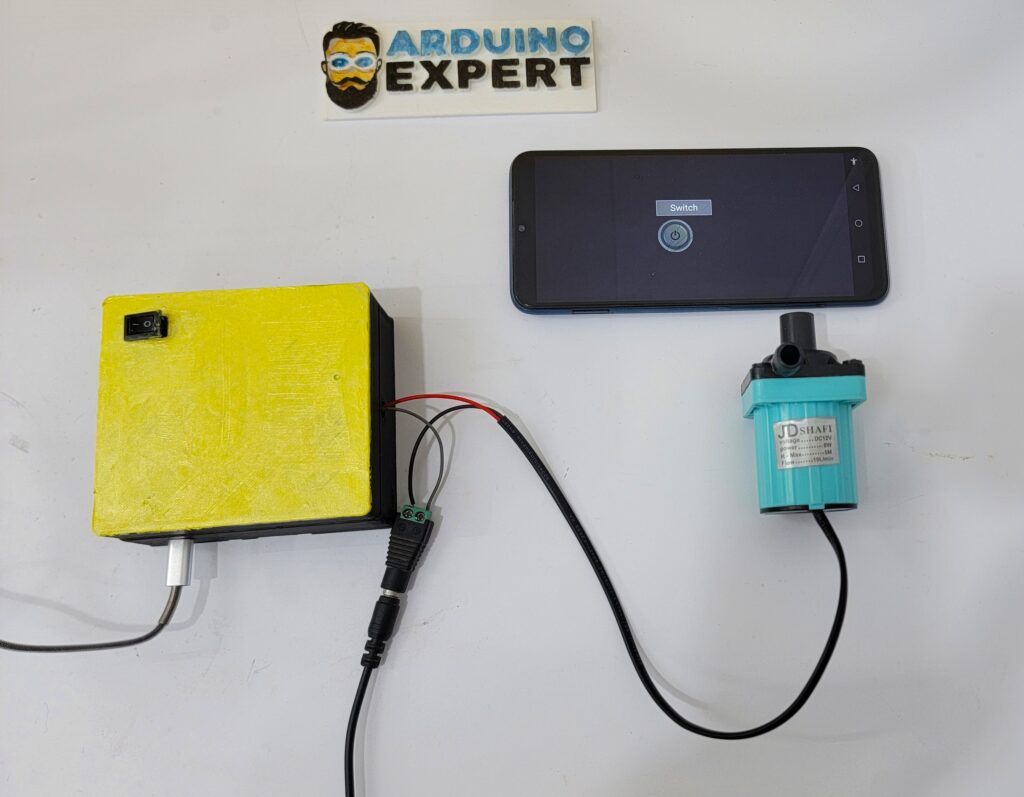
For a dedicated implementation of smartphone-based water pump switching, explore our IoT Water Pump Control System Using ESP32 and Blynk.
This project demonstrates remote pump control through an ESP32 and Blynk application, including electronics development, firmware, and enclosure design.
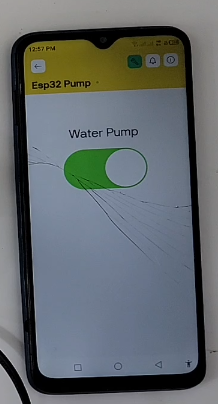
For an integrated water level monitoring example, see our Water Tank and Pump Automation Using ESP32, Ultrasonic Sensor, and Blynk.
Bluetooth Water Pump Control Using ESP32
Not every pump controller needs internet connectivity.
If the controller is installed nearby, Bluetooth may provide a convenient method of controlling it from a smartphone.
ArduinoExpert has also developed a Bluetooth Pump Control System Using ESP32.
Bluetooth is suitable for local operation, configuration, or monitoring within the supported communication range.
For remote access from another city or country, an internet-connected or cellular-based solution is generally more appropriate.
10. How to Make an Automatic Water Pump Controller Using STM32
STM32 microcontrollers are widely used in embedded electronic products and industrial control applications.
They provide a broad selection of microcontroller families, peripherals, timers, communication interfaces, and development tools.
An STM32-based automatic water level controller can be suitable when the application requires a custom embedded hardware design or additional monitoring and control functionality.
Step 1: Choose the STM32 Board
For a learning prototype, an STM32F103C8T6 Blue Pill board can be used.
The board provides digital GPIO connections suitable for reading float switches and controlling an external relay driver.
For more advanced applications, developers may select other STM32 boards according to memory, peripheral, operating temperature, communication, and performance requirements.
Step 2: Connect Sensors and Control Output
For the example program:
- PB12 reads the lower tank float.
- PB13 reads the upper tank float.
- PB14 reads the source-tank float.
- PB15 controls the relay interface.
All sensor interfaces and output drivers must be electrically compatible with the selected STM32 board.
Step 3: Configure the STM32 Development Environment
There are two common programming approaches.
Option 1: Arduino IDE with STM32 Core
This approach is convenient when transferring an Arduino-style automation project to supported STM32 hardware.
Install the STM32 MCU board package using the official STM32duino setup instructions.
Select the correct STM32 board variant and upload method.
Option 2: STM32CubeIDE
For applications requiring STM32 HAL libraries, interrupts, timers, communication peripherals, structured debugging, or more advanced firmware design, STM32CubeIDE is another option.
The example sketch in this tutorial is written for the Arduino-compatible STM32 core. It is not a direct STM32 HAL or STM32CubeIDE project.
Step 4: Upload the Program
Select the appropriate board configuration in Arduino IDE.
Use the common program provided earlier.
The STM32 pin definitions will be selected automatically.
Depending on the development board and configuration, you may need a supported USB bootloader or an ST-Link programming/debugging adapter.
Step 5: Test the STM32 Controller
Test the three sensor inputs and relay-control output under controlled low-voltage conditions.
Verify the automatic filling sequence, source-water cutoff, inconsistent-sensor fault behavior, and runtime protection.
Advanced STM32 Water Pump Control
An STM32-based controller can be extended with additional features such as:
- Multiple pump control.
- Pressure sensor monitoring.
- Flow meter integration.
- Automatic pump alternation.
- RS485/Modbus communication.
- External industrial motor-control interfaces.
- Local HMI displays.
- Data logging and alarms.
- Watchdog supervision.
- Sensor-fault detection.
- Communication with PLC or SCADA systems.
For professional embedded development, ArduinoExpert provides Custom STM32 Firmware and Embedded Systems Development Services.
11. How to Measure Water Tank Level Using an Ultrasonic Sensor
Float switches are suitable for identifying predefined water levels, but they do not provide continuous information about how full the tank is.
For a smart water tank monitoring system, an ultrasonic sensor can be used to estimate the water level in centimeters or as a percentage.
Working Principle
An ultrasonic sensor sends an acoustic pulse toward the water surface.
The sound reflects from the surface and returns to the sensor.
The sensor uses the pulse travel time to estimate the distance to the water.
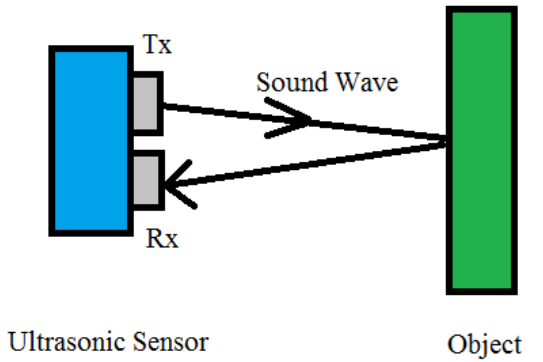
The basic distance formula is:
Distance = (Speed of sound × Echo time) / 2
The division by two accounts for the sound traveling to the water surface and returning.
Calculating Water Level Percentage
For a top-mounted sensor, two calibrated measurements are especially useful:
- Empty distance: Distance measured when the tank is empty.
- Full distance: Distance measured when the tank reaches its selected maximum level.
The water level percentage can be estimated using:
Water Level (%) = [(Empty Distance − Measured Distance) / (Empty Distance − Full Distance)] × 100
For example:
- Empty distance = 90 cm.
- Full distance = 10 cm.
- Current measured distance = 50 cm.
Water Level = [(90 − 50) / (90 − 10)] × 100
Water Level = 50%
The calculated value should be limited to the 0–100% range and invalid sensor readings should be rejected.
This percentage represents calibrated water depth. In tanks with irregular geometry, it may not be the same as the percentage of total water volume.

Ultrasonic Sensor Integration with ESP32
A typical smart ultrasonic water-level monitoring system contains:
- ESP32 microcontroller.
- Waterproof ultrasonic sensor.
- Relay or motor-control interface.
- Appropriate DC power supplies.
- Wi-Fi connectivity.
- Optional mobile application or local display.
- Independent safety sensors.
If the ultrasonic sensor produces a 5V echo signal, a suitable level shifter or voltage divider is required before connecting it to an ESP32 or a non-5V-tolerant STM32 input.
Practical tip: Check the ultrasonic sensor’s minimum measurable distance, beam angle, condensation exposure, turbulence, and installation position. A sensor with a large blind zone may not be suitable for a shallow tank.
Our ESP32 Water Tank Automation Project provides a related practical example of ultrasonic water level monitoring.
12. IoT Water Pump Automation Using NodeMCU ESP8266
Although Arduino, ESP32, and STM32 are the primary platforms discussed in this guide, NodeMCU ESP8266 is another useful option.
NodeMCU is popular for low-cost Wi-Fi automation projects.
A NodeMCU-based water pump monitoring system can connect sensors and a relay interface while sending information to a cloud application.
ArduinoExpert developed an IoT Water Pump Tank Automation and Temperature Monitoring System Using NodeMCU ESP8266.
The project integrates:
- NodeMCU ESP8266.
- Ultrasonic water level measurement.
- Waterproof DS18B20 temperature sensor.
- Relay-controlled water pump operation.
- I2C LCD display.
- Blynk IoT mobile application.
- Automatic and manual control modes.
It demonstrates how a relatively simple water pump controller can be expanded to include additional sensing and user interface features.
For projects requiring continuous water temperature monitoring alongside tank level automation, this type of architecture can be particularly useful.
13. How to Control a Water Pump Using a Mobile Phone
A smart water pump controller can be designed to work with different communication technologies.
The most appropriate technology depends on the application, distance, connectivity, cost, and reliability requirements.
Wi-Fi Water Pump Control
Wi-Fi is suitable for homes, buildings, laboratories, and facilities where wireless network coverage is available.
An ESP32 can communicate with a smartphone application or IoT dashboard.
With an appropriate cloud or remote-access system, authorized users can monitor or control their water pumps from different locations.
Bluetooth Water Pump Control
Bluetooth is useful for local smartphone control when internet connectivity is unnecessary.
It is well suited for nearby configuration, testing, and local pump switching.
GSM and SMS Water Pump Control
For remote agricultural locations, GSM or other suitable cellular technologies may be preferable to Wi-Fi.
An SMS-enabled controller can receive commands from an authorized mobile number and operate a pump through appropriate motor-control equipment.
This approach does not require fixed broadband internet at the pump location, although compatible cellular network and SMS service are necessary.
Our Tubewell Water Pump Control Through SMS or Smartphone App project demonstrates a related remote-control concept.
For a more detailed explanation, read our guide on How to Control a Solar Tubewell Water Pump by SMS Without Internet.
LoRa Water Pump Monitoring
LoRa can be useful for communicating sensor readings across long distances between tanks, pumping stations, agricultural fields, and monitoring points.
However, LoRa alone does not provide a mobile internet connection. A gateway or another communication link is required when internet-based monitoring is needed.
Comparing Water Pump Communication Technologies
| Technology | Typical use | Main consideration |
|---|---|---|
| Wi-Fi | Home and building monitoring | Requires network coverage |
| Bluetooth | Nearby smartphone control | Limited operating range |
| GSM/SMS | Remote pumps and farms | Requires compatible cellular service |
| 4G/Cellular IoT | Remote dashboards and alerts | Data plan and network coverage |
| LoRa | Long-distance sensor networks | Gateway and network design |
| RS485/Modbus | Industrial pumps and VFDs | Wired device compatibility |
For applications requiring custom phone interfaces, ArduinoExpert also offers Mobile and Web App Development Services.
14. Automatic Water Pump Control with Dry-Run and Overflow Protection
One of the most important parts of a reliable water pump controller is protecting the equipment.
A system that can turn a pump ON and OFF is not necessarily a complete pump protection system.
Water Tank Overflow Protection
An upper-level sensor normally tells the controller when the destination tank is full.
The firmware then switches the pump OFF.
However, sensor failure, disconnected wiring, software problems, or a welded switching contact could prevent normal shutdown.
A more robust design can use:
- Primary water level sensing.
- Independent high-high-level float switch.
- Hardwired safety shutdown.
- Maximum pump runtime limit.
- Fault indication.
- Properly rated motor-control equipment.
Dry-Run Protection
A water pump may run without sufficient water because of:
- An empty source tank.
- Blocked suction piping.
- Loss of priming.
- Air entering the suction line.
- Inadequate source flow.
- Other hydraulic or equipment faults.
A source-tank float switch helps prevent operation when the available water level is too low.
For additional protection, the system may need:
- Flow monitoring.
- Pressure sensing.
- Motor current monitoring.
- Underload detection.
- VFD-based dry-run protection.
- Fault feedback from the pump controller.
Pump Runtime Protection
A runtime limit provides a useful additional safety feature.
For example, if a pump normally fills a tank within ten minutes, an unexpected increase in filling time could indicate a problem.
The controller may be programmed to stop the pump after a configured maximum runtime.
The timeout should be based on measured system performance rather than an arbitrary value.
Safe Manual Control
If a manual ON/OFF function is added through a touchscreen, mobile application, or local button, essential safety interlocks should remain active.
Manual commands must not bypass low-source-water protection, emergency stops, motor overload protection, or other required safety functions.
15. Troubleshooting an Automatic Water Pump Controller
During development, you may encounter several common issues.
| Problem | Possible reason | Recommended check |
|---|---|---|
| Pump command does not turn ON | Incorrect float orientation or relay polarity | Verify sensor states and relay logic |
| Pump does not stop at the upper level | Upper sensor or wiring fault | Test upper-level input and independent cutoff |
| Pump switches frequently | Sensor chatter or unstable water level | Add filtering, debounce and hysteresis |
| ESP32 resets when relay activates | Electrical noise or inadequate power supply | Review supply isolation, grounding and relay driver |
| Incorrect ultrasonic readings | Sensor blind zone, condensation or mounting | Check installation and sensor validity |
| Remote app does not connect | Wi-Fi or cloud connection problem | Check network configuration |
| Relay works but pump does not | External control or motor circuit issue | Have qualified personnel inspect motor equipment |
| Pump stops before tank is full | Maximum runtime too short | Measure actual filling time and inspect flow |
For permanent installations, additional testing should cover power failures, reconnection behavior, sensor disconnections, electrical noise, communication failures, and long-term outdoor operation.
16. Applications of Smart Water Pump Automation Systems
Home Water Tank Automation
A smart controller can automatically transfer water from an underground tank to an overhead storage tank.
This reduces the need for residents to manually monitor tank levels.
Apartment and Commercial Building Water Management
Larger buildings may require monitoring of multiple water tanks, transfer pumps, and booster pumps.
A centralized monitoring dashboard can display tank levels, pump status, alarms, and maintenance information.
Agricultural Irrigation
A water pump automation system can be combined with soil moisture sensors, irrigation schedules, and remotely controlled valves.
ArduinoExpert provides Smart Irrigation System Development Services for agricultural farms, gardens, greenhouses, and other irrigation applications.
Solar Tubewell Water Pump Control
Solar-powered water pumping systems may use VFDs or dedicated pump controllers.
Remote operation can be provided using compatible control inputs or RS485/Modbus communication.
ArduinoExpert has developed the AabNex SMS Solar Tubewell VFD Controller, which supports SMS-based remote operation and monitoring for compatible VFD systems.
This is an example of moving beyond a basic relay project to more advanced pump-control integration.
Industrial Water Management
Industrial systems may require:
- Multiple water tanks.
- High and low-level alarms.
- Continuous liquid-level monitoring.
- Pump alternation.
- Flow and pressure monitoring.
- Motor fault feedback.
- PLC or SCADA integration.
- Data logging.
- Remote supervision.
Such systems should be engineered according to the applicable electrical, safety, and operational requirements.
17. How to Convert a DIY Water Pump Controller into a Commercial Product
A breadboard-based water pump controller is useful for learning and verifying the basic control concept.
However, developing a commercial water tank monitoring product requires additional engineering.
Custom PCB Design
A custom PCB can integrate the microcontroller, sensor interfaces, power regulation, communication circuitry, and pump-control output stages.

Reliable Power Supply Design
The system should tolerate expected voltage fluctuations and electrical noise while maintaining defined and safe operating states.
Enclosure Design
Depending on the installation, the enclosure may require protection against dust, splashes, humidity, sunlight, and environmental exposure.
Firmware Development
Commercial firmware may need:
- Sensor filtering and calibration.
- Watchdog supervision.
- Fault logging.
- Communication recovery.
- Secure device configuration.
- Controlled firmware updates.
- Defined recovery after power loss.
- Safe relay and contactor startup behavior.
Mobile App and Cloud Integration
A commercial smart water tank monitoring product may provide:
- Multiple user accounts.
- Tank level graphs.
- Push notifications.
- Device status.
- Pump operating history.
- Remote configuration.
- Multi-site monitoring.
- Secure communication.
Testing and Validation
The complete controller should be tested under realistic operating conditions, including fault scenarios and loss of communication.
At ArduinoExpert, we provide Custom Electronics and IoT Project Development Services covering hardware design, embedded programming, prototyping, and product development.
19. Need a Custom Automatic Water Pump Controller or Smart Water Tank Monitoring System?
Every water pump automation project has different requirements.
A homeowner may need a simple automatic overhead tank controller, while a farmer may require GSM-based tubewell control. A commercial building may need several tank sensors, multiple pumps, alarms, and centralized monitoring.
At ArduinoExpert, we develop customized electronics, IoT, and embedded automation solutions.
Our services include:
- Arduino-based water pump controller development.
- ESP32 Wi-Fi water pump monitoring systems.
- STM32 embedded firmware development.
- Automatic water level controller design.
- Smart underground and overhead tank monitoring.
- IoT dashboards and mobile applications.
- Pump scheduling and irrigation automation.
- GSM, Bluetooth, Wi-Fi, and LoRa connectivity.
- PCB design and embedded product development.
- Prototype development and testing.
If you want to develop your own system, explore our Smart Water Tank Level Monitoring and Pump Automation Development Services.
Conclusion
Building an automatic water pump controller using Arduino, ESP32, or STM32 is a practical way to learn embedded electronics while developing a useful water management system.
A basic design requires a microcontroller, water level sensors, a suitable relay-control interface, and a properly protected pump circuit.
For beginners, Arduino Uno provides a straightforward introduction to automatic water level control.
For smart home and IoT applications, ESP32 offers built-in wireless connectivity and convenient integration with mobile monitoring platforms.
For advanced custom embedded systems, STM32 provides a broad platform for developing specialized monitoring and automation solutions.
The most important engineering consideration is not simply turning the pump ON and OFF. A reliable system should also account for tank overflow, low source-water conditions, sensor failures, motor protection, electrical safety, and safe operation during communication interruptions.
By combining thoughtful hardware design, reliable embedded programming, and appropriate protection systems, you can develop an automatic water pump controller suitable for your intended application.
For more practical embedded electronics and automation projects, visit ArduinoExpert.com.
Can Arduino automatically turn a water pump ON and OFF?
Yes. Arduino can read water level sensors and control a suitable relay or motor-control interface. It can automatically start the pump when water is low and stop it when the tank becomes full.
Which microcontroller is best for an automatic water pump controller?
Arduino Uno is convenient for beginner projects, ESP32 is particularly suitable for Wi-Fi and IoT monitoring, and STM32 offers a broad range of options for custom embedded designs. The best choice depends on the application.
Can I control a water pump using ESP32 and a smartphone?
Yes. ESP32 can communicate with applications such as Blynk or a custom IoT dashboard over Wi-Fi. Many ESP32 variants can also support local Bluetooth-based control.
Can an automatic water pump controller work without internet?
Yes. Basic water level monitoring and automatic pump switching can operate directly on the microcontroller without internet access. Wi-Fi, GSM, or other communication technologies are optional additions.
How can I automatically stop a water pump when the tank is full?
Install a suitable high-level sensor in the destination tank and use the controller to switch the pump OFF when the selected level is reached. For dependable protection, consider an additional independently wired overflow cutoff.
How can I prevent my water pump from running dry?
Use appropriate low-source-water monitoring and, where necessary, flow, pressure, current, or VFD-based protection. A high-level sensor in the destination tank alone does not protect against dry running.
Can I monitor both underground and overhead water tanks?
Yes. A smart system can monitor the underground source tank and overhead destination tank separately. The controller can permit pumping only when the destination needs water and the source has sufficient water.
Can STM32 be used for industrial water pump automation?
Yes. STM32 microcontrollers can be integrated into custom industrial monitoring and control systems using suitable sensors, interface electronics, communication protocols, and safety equipment.
Can I use an ultrasonic sensor instead of a float switch?
Yes. An ultrasonic sensor can provide continuous water level measurements, provided the tank dimensions and installation conditions suit the sensor. A separate safety float may still be desirable.
Can I automate agricultural pumps and solar tubewells?
Yes. Agricultural pump automation can use timers, tank sensors, soil moisture monitoring, GSM/SMS communication, cellular IoT, or VFD integration, depending on the installation.
Does an ESP32 water pump controller continue working if Wi-Fi disconnects?
It can, if the firmware is designed to keep essential pump-control decisions local. Cloud connectivity should be an optional monitoring layer rather than a requirement for basic safety functions.
Can ArduinoExpert develop a custom water pump automation system?
Yes. ArduinoExpert provides customized solutions involving Arduino, ESP32, STM32, sensor integration, water level monitoring, embedded firmware, pump-control interfaces, IoT dashboards, and product development.