In modern manufacturing, industries are increasingly moving toward smart automation, robot-assisted material handling, and embedded control systems to improve production speed, repeatability, and operator safety. Many production environments still rely on partial manual processes for loading trays, positioning material, and coordinating with machines such as laser cutters, engravers, or marking systems. These semi-manual steps often reduce efficiency, introduce inconsistency, and increase cycle time.
At Arduino Expert, we developed this custom client solution as a specialized Robotics Project and Arduino Project that combines an xArm robot, Arduino Leonardo, stepper motor motion control, and sensor-based verification into one integrated workflow. The purpose of this system is to automate the sequence of material placement, tray verification, tray transfer, machine/software triggering, and return movement for the next cycle.
This project is an excellent example of how Embedded Systems Development, Automation Projects, and robot integration can be used together to build a practical industrial workflow. Instead of depending on an operator to manually place, align, move, and start the process every time, the system uses a robotic arm and Inductive Proximity Sensor-assisted control logic to make the process more reliable and efficient.
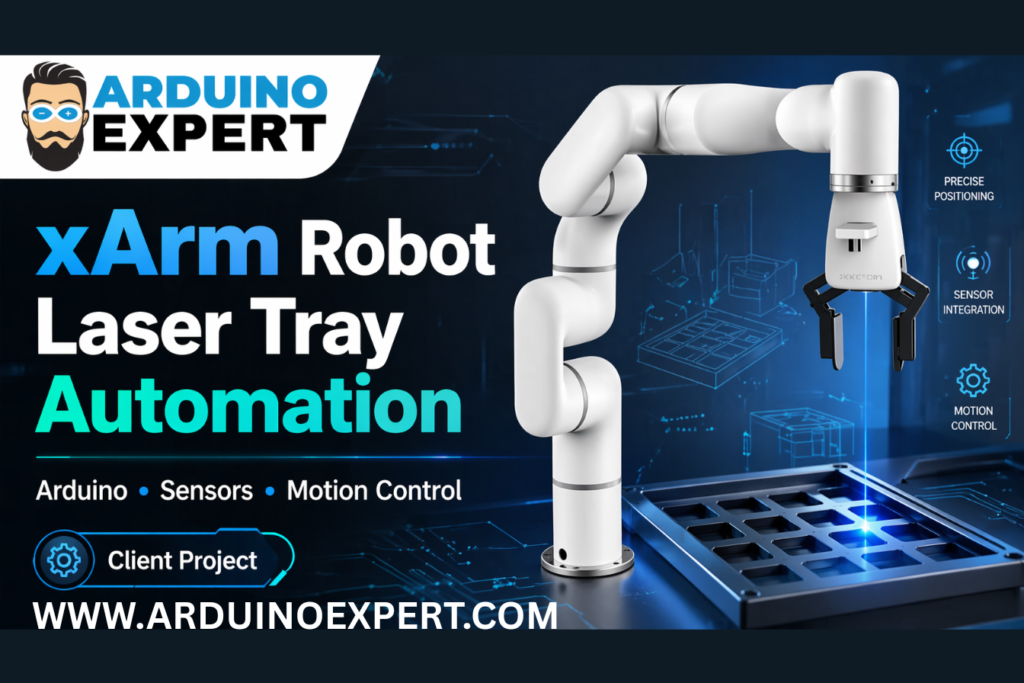
The result is a compact and intelligent automation solution that helps improve production flow, reduce human involvement in repetitive handling tasks, and create a more professional and scalable production setup. This kind of custom development is particularly useful for laser processing, industrial positioning systems, repeatable tray movement, pick-and-place workflows, and machine-assisted production lines.
For businesses looking for custom electronics project development, robotics integration, and industrial embedded automation, this project demonstrates the value of combining software logic, sensor feedback, and electromechanical control into one dependable system. If you need our Services for Automation Projects or Robotics Projects you can contact us.
xArm Robot Integrated Laser Tray Automation System Project Overview
This client project was designed as an automated tray loading and positioning system integrated with an xArm robot and an Arduino Leonardo. The system verifies whether the workpiece or sheet is properly placed on the tray, drives a stepper motor to move the tray toward the laser work area, triggers a machine/software action through USB keyboard emulation, and then returns the tray back to its original position after the process is completed.
The automation sequence combines:
- Robot arm interaction
- Tray presence detection
- Stepper motor based linear movement
- Embedded process control
- Laser-side detection feedback
- Computer/machine triggering through Arduino Leonardo
This project reflects our expertise in Robotics Projects, Arduino Project development, Embedded Systems Development, and Automation Projects for industrial and semi-industrial use cases.
Client Requirement
The client required a custom automation solution that could support a machine-based production process with reduced manual intervention. The key challenge was to create a workflow where:
- an xArm robot places the material or sheet onto a tray,
- the system confirms proper placement through multiple sensors,
- the tray moves automatically toward the process area,
- the machine or software is triggered at the correct time,
- the tray returns after the cycle is complete,
- and the entire sequence is repeatable for continuous operation.
This requirement is common in modern production environments where manufacturers want to improve throughput and reduce dependency on manual loading and machine coordination.
Checkout our Related Project: Robotic Arm with Arduino and Servo Motors
Arduino Expert Solution
To meet the client’s requirement, we designed and implemented a smart embedded control system around the Arduino Leonardo. The Arduino acts as the central controller and communicates with the rest of the system using digital inputs and outputs.
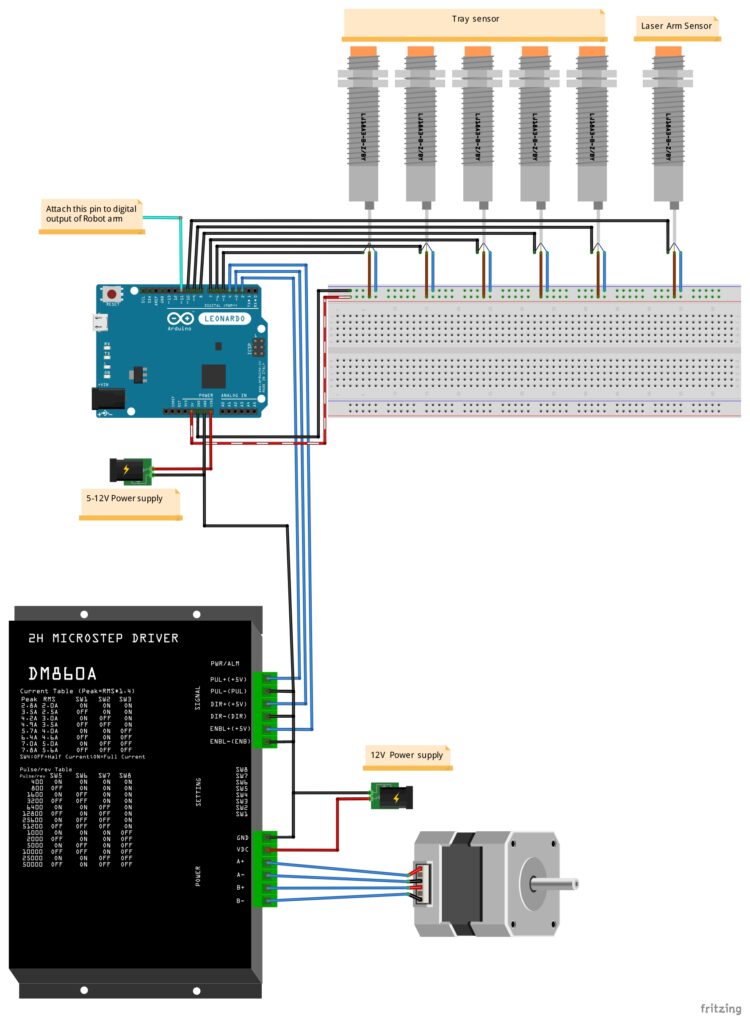
The system receives a signal from the xArm robot after the material has been placed. It then checks multiple tray sensors (Inductive Proximity Sensors) to ensure the workpiece is correctly positioned. Once the placement is confirmed, the Arduino drives a DM860A stepper driver to move the tray using a stepper motor. After the tray reaches the required position, the Arduino Leonardo sends a keyboard command to the connected computer, allowing it to trigger or assist the laser-side process.
After a defined process interval and final confirmation through another sensor, the tray is moved back to its home position, ready for the next robotic loading cycle.
This is a strong example of a practical custom automation project where robotics, embedded electronics, motion control, and software integration work together in one coordinated system.
Purpose of the Custom Robotics Project for Automated Laser Tray Handling Project
The exact purpose of this project is to create a robot-assisted automatic tray transfer and process triggering system for a laser-related machine workflow.
More specifically, the project is intended to:
- automate the loading and positioning workflow,
- verify correct tray or sheet placement,
- reduce operator handling,
- coordinate movement between robotic loading and machine-side processing,
- improve cycle consistency,
- support repeatable production,
- and build a scalable custom automation platform for industrial use.
This project is not just a simple motor control system. It is a complete embedded automation solution that bridges the gap between robotic handling, sensor confirmation, motion control, and machine/software triggering.
Working of Arduino Based Laser Machine Tray Automation with xArm Robot
1. xArm Robot Places the Material
The xArm robot is used to place the workpiece, sheet, or target material onto the tray. Once the placement is complete, the robot provides a digital signal to the Arduino to indicate that the material has been loaded.
2. Tray Sensors Verify Placement
Multiple tray sensors (Inductive Proximity Sensors) are used to check whether the material is properly present and aligned. This step is very important because it prevents the system from moving the tray forward if the workpiece is not positioned correctly.
3. Arduino Processes the Verification
The Arduino Leonardo continuously monitors the robot signal and the tray sensors. Only when all required placement conditions are satisfied does the system proceed to the next stage.
4. Stepper Motor Moves the Tray
A stepper motor controlled through a DM860A microstep driver moves the tray toward the processing area. This ensures controlled and repeatable motion, which is necessary for industrial positioning tasks.
5. Laser/Machine Side Action is Triggered
Once the tray reaches the required position, the Arduino Leonardo uses its USB HID capability to emulate a keyboard command to the connected computer. This allows the system to trigger software or machine-side action as part of the automated workflow.
6. Process Completion / Position Confirmation
A separate sensor on the laser side is used as an additional confirmation point. This helps the system know when the next motion step can safely happen.
7. Tray Returns to Home Position
After the required process time and confirmation, the stepper motor moves the tray back to the home position so the system is ready for the next cycle.
This sequence creates a clean and efficient production loop using robotics, embedded control, and sensor-driven automation.
Hardware Used in This Project
Arduino Leonardo
We selected the Arduino Leonardo because it offers both standard embedded control functionality and USB keyboard emulation. This makes it especially useful when a project needs to interact with computer software as if it were a human keyboard input device.
xArm Robot
The xArm robot plays the role of the loading mechanism. It helps automate the repetitive material placement process and integrates with the Arduino-based system through a digital signal.
DM860A Stepper Driver
The DM860A is used to drive the stepper motor with stable pulse and direction control. This allows accurate and repeatable tray movement.
Stepper Motor
The stepper motor provides controlled mechanical movement of the tray. It is ideal for applications where precise position-based motion is required.
Inductive Proximity Sensor Switch – LJ18A3-8-Z/BY (Tray Sensors)
Multiple sensors are installed to confirm the presence and correct placement of the workpiece. These sensors improve reliability and prevent incorrect operation.
Laser Arm Sensor / Process Side Sensor
This sensor is used to detect or confirm the tray/material status on the processing side of the system.
Power Supply Arrangement
The project uses external power sources for control electronics and motion hardware, ensuring stable operation for both the Arduino and the motor driver system.
Checkout Our Industrial Grade Project: Automatic Cutting Machine using Controllino Mega PLC
Circuit Diagram of Arduino Leonardo with Inductive Proximity Sensor, Robot Arm and Stepper Motor Driver (DM860A)
Arduino Leonardo Code for Custom Robotic Project
#include <Keyboard.h>

//Number Steps
int Step_1 = 200;
int Step_2 = -200;

// Define pins
const int pulsePin = 2;
const int dirPin = 3;
const int enablePin = 4;
const int armSignalPin = 11; // Pin for detecting sheet placed signal
const int sensorPins[] = {5, 6, 7, 8, 9}; // Proximity sensors for sheet detection
const int thirdSensorPin = 10; // Third sensor for laser cutting detection

// Variables
bool allSensorsActive = false;
bool armSignalReceived = false; // Flag to track if the arm signal was received
unsigned long startTime;
const unsigned long laserCuttingTime = 10000; // Example time for laser cutting in milliseconds

void setup() {
  Serial.begin(9600);

  // Set motor control pins as output
  pinMode(pulsePin, OUTPUT);
  pinMode(dirPin, OUTPUT);
  pinMode(enablePin, OUTPUT);

  // Set sensor pins as input
  for (int i = 0; i < 5; i++) {
    pinMode(sensorPins[i], INPUT);
  }
  pinMode(thirdSensorPin, INPUT);
  pinMode(armSignalPin, INPUT);

  // Initialize motor driver
  digitalWrite(enablePin, LOW); // Enable the driver

  // Initialize Keyboard
  Keyboard.begin();
}
Why This Project Matters?
In many industrial environments, the biggest production problems do not come from the main machine itself, but from the small repetitive tasks around it. Loading, alignment, movement, and timing often consume significant manpower and introduce inconsistency.
This project addresses those real-world challenges by offering:
- faster production cycles
- reduced manual handling
- better repeatability
- sensor-based process safety
- improved coordination between robot and machine
- custom workflow automation
- flexibility for future upgrades
For a client, this means the system can become a valuable part of a broader smart manufacturing setup.
Benefits of This Custom Robotics Project
Improved Efficiency
The system reduces manual process steps and creates a smoother production sequence.
Better Repeatability
Using sensors and programmed motion control helps maintain consistent cycle behavior.
Lower Human Error
The tray only moves when the material is properly detected, reducing the risk of improper operation.
Machine Coordination
The system bridges the gap between robotic loading and machine/software triggering.
Scalable Design
The same concept can be extended for more advanced industrial production workflows.
Professional Embedded Control
The project demonstrates how a compact Arduino-based solution can deliver reliable industrial-style automation when designed properly.
If you need a Powder Dosing Solution you can explore our Powder Dispenser Machine with Touch LCD Control and Arduino
Applications of Robot Assisted Laser Workpiece Loading System
Projects like this can be adapted for many industrial and semi-industrial applications, including:
- laser cutting machine support systems
- laser engraving automation
- laser marking process automation
- robotic workpiece loading systems
- automated tray transport systems
- industrial pick-and-place workflows
- CNC support automation
- quality positioning stations
- custom material handling systems
- production cell automation
Why Clients Choose Custom Development Instead of Generic Solutions
Off-the-shelf systems often do not match the exact production flow of a client. In many cases, manufacturers need a solution tailored to their tray size, robot logic, process timing, machine behavior, sensor arrangement, and software environment.
That is where custom electronics project development becomes important.
At Arduino Expert, we design systems based on the client’s actual workflow rather than forcing the client to adapt to a generic control box. This gives better operational results and makes future upgrades easier.
Our Role in the Project
For this client project, our work involved understanding the required automation flow and developing a practical embedded control solution that could integrate motion control, robot signaling, and process logic.
This type of work reflects our capabilities in:
- Robotics Projects
- Arduino Project development
- Embedded Systems Development
- Automation Projects
- Custom Electronics Project Development
- Industrial motion control integration
- Sensor-based automation
- Machine interface logic
Conclusion
This project is a strong example of how robotics, embedded systems, and industrial automation can be combined to solve practical production challenges. By integrating an xArm robot with an Arduino Leonardo, multiple sensors, and a controlled stepper motor mechanism, we delivered a system that improves process reliability, reduces manual effort, and supports repeatable machine-side operation.
For clients who need more than a basic controller and are looking for a tailored automation workflow, this kind of system offers real value. It shows how custom engineering can turn a manual or semi-manual production step into a smarter, safer, and more scalable process.
You can contact us through WhatsApp for any Project, like xArm Robot Integrated Laser Tray Automation System with or without Modifications or Customization.

FAQs – xArm Robot Laser Tray Automation System
1. What is the purpose of this xArm robot and Arduino based automation project?
The purpose of this project is to automate the workflow of material placement, tray verification, tray movement, and machine/software triggering in a laser-related production setup. An xArm robot places the workpiece, the Arduino Leonardo checks multiple sensors, and a stepper motor driven mechanism moves the tray into position. This helps reduce manual work and improves production consistency.
2. Which controller was used in this project?
This project was developed using the Arduino Leonardo. It was selected because it not only handles embedded control tasks like reading sensors and controlling the stepper driver, but also supports USB keyboard emulation, which allows it to send commands directly to a connected computer or machine software.
3. Why was the Arduino Leonardo used instead of another Arduino board?
The Arduino Leonardo was a suitable choice because it can function as a USB Human Interface Device (HID). In this project, that feature is useful for sending keyboard commands to the connected computer, making it easier to integrate the automation system with machine-side software. At the same time, it provides reliable digital I/O control for sensors and motion sequencing.
4. What role does the xArm robot play in this project?
The xArm robot is used for automated material handling. It places the sheet, workpiece, or item onto the tray and then sends a digital signal to the Arduino-based control system. This makes the robot an important part of the complete automation cycle, helping reduce repetitive manual loading tasks.
5. What is the function of the tray sensors in this automation system?
The tray sensors (Inductive Proximity Sensor) are used to detect whether the material is properly placed on the tray. Before the system allows the tray to move, the Arduino verifies the sensor inputs. This sensor-based confirmation improves system reliability and helps prevent incorrect movement or processing when the workpiece is not positioned correctly.
6. What is the purpose of the stepper motor and driver in this project?
The stepper motor is used to move the tray between positions in a controlled and repeatable way. The motor is driven by a DM860A stepper driver, which receives pulse and direction signals from the Arduino Leonardo. This combination provides accurate tray movement that is suitable for automation and industrial positioning applications.
7. Is this project only for laser cutting machines?
Not necessarily. While this project appears to be designed for a laser-related workflow, the same concept can also be adapted for other industrial automation uses such as laser engraving, laser marking, CNC support automation, robotic workpiece handling, and custom tray movement systems. The design can be modified according to the client’s application.
8. How does the system interact with the computer or machine software?
The system uses the USB keyboard emulation capability of the Arduino Leonardo. Once the tray reaches the desired position, the Arduino can send a keyboard shortcut or command to the connected computer. This allows the automation system to trigger or coordinate with machine software without needing a more complex communication interface.
9. Can this project be customized for other industries or workflows?
Yes, this type of project can be customized for many industries and production environments. The logic, sensors, motion system, and robot interaction can all be modified depending on the client’s process. At Arduino Expert, we build custom electronics project development solutions based on actual operational requirements rather than using one-size-fits-all designs.
11. Is this a complete industrial automation solution or just a prototype?
This kind of project can serve as either a working prototype or a complete custom automation module, depending on the client’s requirements. The system architecture demonstrates a real-world automation workflow with robotic integration, motion control, and process logic, making it suitable for further scaling into industrial production systems.
12. What services does Arduino Expert provide for similar projects?
We provide a wide range of custom development services for projects like this, including:
Robotics Projects
Arduino Projects
Embedded Systems Development
Automation Projects
Custom Electronics Project Development
Product Design and Development
Sensor based automation systems
Motion control and machine integration
You can also explore Our Previous Projects to see more custom solutions we have developed for clients.
13. Can Arduino Expert develop similar custom robotics automation systems for clients?
Yes, we develop tailored robotics and automation systems based on client requirements. Whether the need is for a robotic loading system, sensor-based machine control, tray automation, embedded process control, or a fully customized industrial workflow, our team can design and develop the required solution.