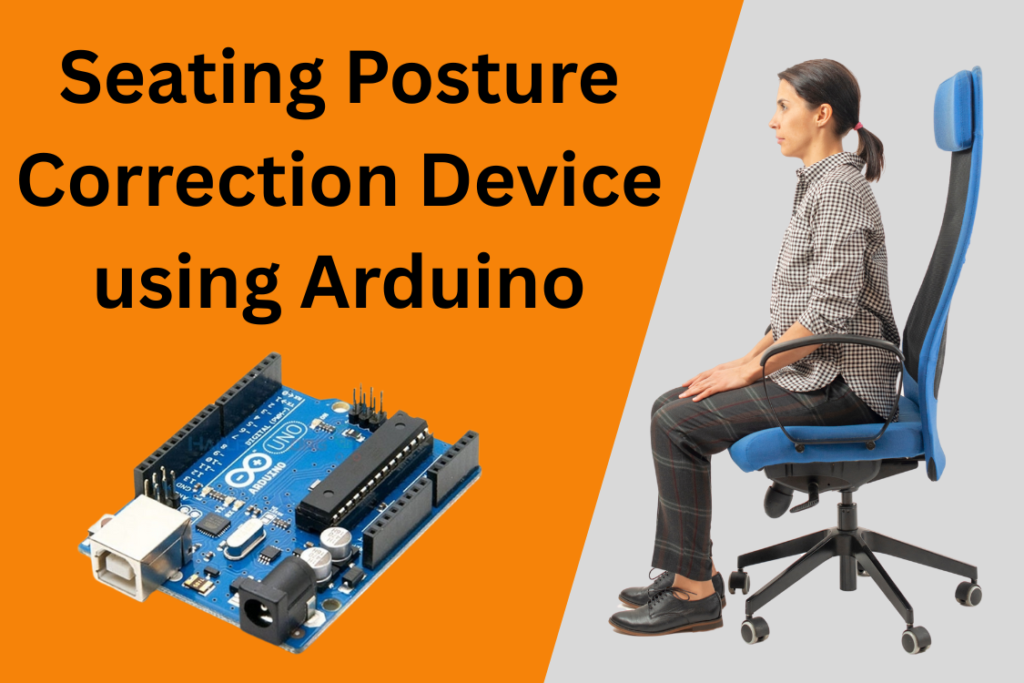
In today’s digital era, where prolonged sitting has become a routine part of work, study, and leisure activities, poor posture is a growing concern. Extended hours of improper sitting can lead to back pain, neck strain, and long-term musculoskeletal disorders. To address this health issue in a simple and cost-effective manner, we have developed a Seating Posture Correction Device using Arduino Uno, an ultrasonic sensor, buzzer, RGB LED, and two push buttons. The Seating Posture Correction Device is an innovative Arduino project designed under the concept of Product Design and Development to promote healthy sitting habits through smart sensing and feedback.
This smart system helps users maintain a healthy seating posture by continuously monitoring the distance between their upper body and a reference point (like the backrest of a chair or a monitor). The user sets their correct sitting distance using a button. The system then defines a safety range (±10 cm of the set distance). Whenever the user leans too far forward or backward—indicating a deviation from correct posture—the device provides instant feedback using a buzzer sound and a color-coded LED alert. It’s a compact, user-friendly tool to promote better ergonomic habits and prevent posture-related health issues.
his project demonstrates practical Arduino Programming and real-world application of sensor-based automation. It is a great example for students, engineers, and designers working on Arduino Projects that combine electronics, ergonomics, and smart feedback systems. Beyond programming, the project also emphasizes the complete product design cycle, from concept development to physical modeling and enclosure fabrication.

Objective of Seating Posture Correction Device:
To design a low-cost, non-intrusive device that monitors the user’s sitting posture using an ultrasonic sensor. The user sets their “ideal” seating distance using a button, and the device continuously checks whether they maintain that posture. If the user leans forward or backward beyond a safe range (±10 cm), the system alerts them with a buzzer and RGB LED
Components used in Seating Posture Correction Device:
| Component | Quantity |
|---|---|
| Arduino Uno R4 Wi-Fi | 1 |
| Ultrasonic Sensor (HC-SR04) | 1 |
| Buzzer | 1 |
| RGB LED | 1 |
| 220Ω Resistors | 3 |
| Push Buttons (Set & Reset) | 2 |
| Breadboard & Jumper Wires | As needed |
| LCD | 1 |
Working Principle of Seating Correction Posture Device:
Setup Phase:
- On pressing the “Set Posture” button, the system reads and stores the current distance from the ultrasonic sensor.
- It defines a valid range:
Min_Range = Distance - 10 cmMax_Range = Distance + 10 cm
Monitoring Phase:
- The device constantly measures the distance in real-time.
- If the user leans too far forward or backward (distance is outside the valid range), the buzzer sounds, and the RGB LED turns red.
- If within the range, the RGB LED glows green, and the buzzer remains silent.
Resetting Reference:
- Pressing the “Reset” button clears the saved distance, allowing a new posture reference to be set.
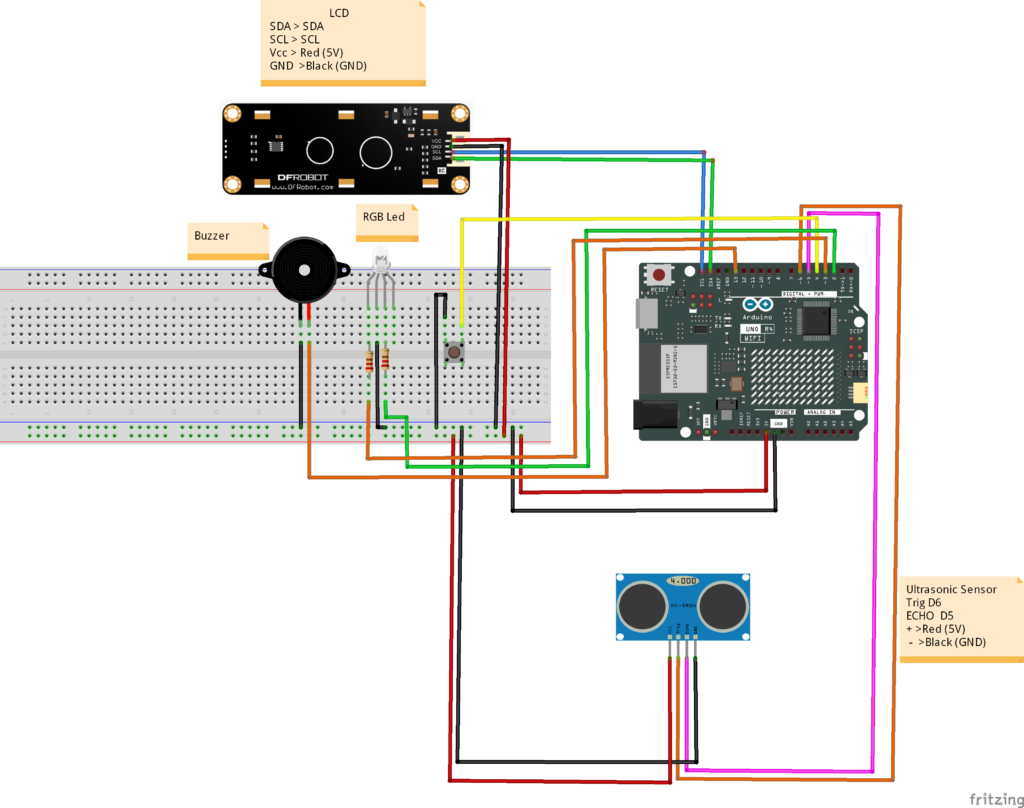
Circuit Diagram of Seating Posture Correction Device:
➤Ultrasonic Sensor (HC-SR04):
- VCC → 5V
- GND → GND
- TRIG → Pin 5
- ECHO → Pin 6
➤ Button:
- “Set” Button → Pin 4 (with pull-down resistor)
➤ Buzzer:
- Positive → Pin 13
- Negative → GND
➤ RGB LED:
- Red → Pin 2 (with 220Ω resistor)
- Green → Pin 3 (with 220Ω resistor)
- Blue → Not used or Pin 7 (optional)
Casing Design and 3D Modeling
As part of the Product Design and Development process, a custom 3D-designed casing was created to house all electronic components securely and neatly. Using 3D Design and Modeling software such as Fusion 360 or SolidWorks, the enclosure was designed to ensure both functionality and aesthetics.
The casing features:
- Dedicated compartments for the Arduino Uno, ultrasonic sensor, buzzer, and RGB LED.
- Front opening for the ultrasonic sensor to accurately measure distance.
- Button slots on the top for easy user access to “Set” and “Reset” controls.
- Ventilation holes to prevent heat buildup.
- Snap-fit or screw-based design for easy assembly and maintenance.
- Compact and ergonomic structure suitable for placement on a desk or monitor stand.
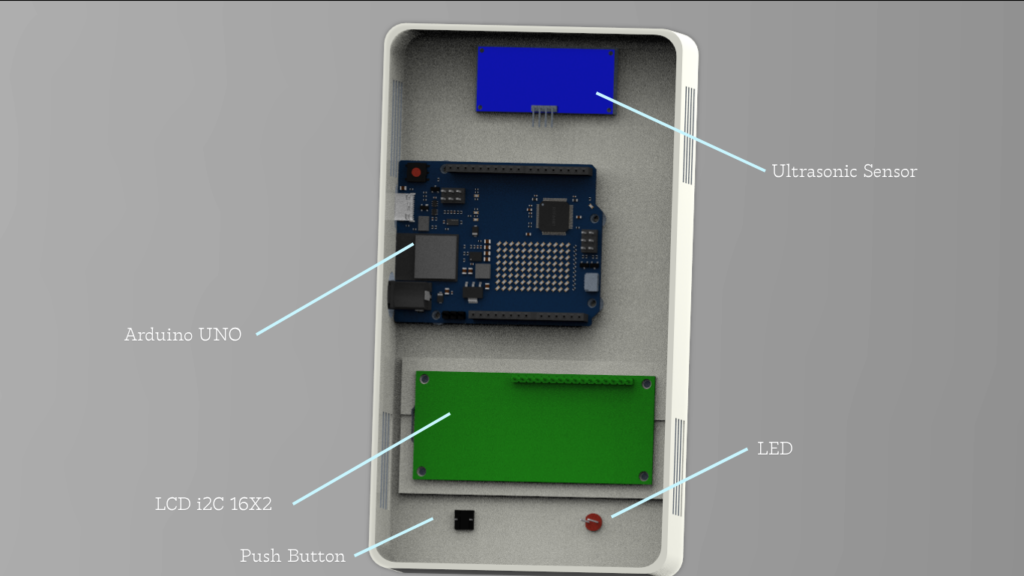
The enclosure was 3D printed using durable PLA material with smooth surface finishing. This design not only protects the circuit from dust and accidental contact but also gives the project a professional, product-like appearance—an essential step in transforming a prototype into a market-ready solution.
Through this combination of Arduino Programming, 3D Design and Modeling, and practical product design, the project goes beyond basic prototyping to showcase how technology and design can work together to create an innovative and user-friendly posture correction device.
Arduino Code for Seating Posture Correction Device:
#define trigPin 9
#define echoPin 10
#define buzzer 11
#define buttonSet 2
#define buttonReset 3

#define redPin 5
#define greenPin 6

long duration;
float distance;
float referenceDistance = 0;
float minRange = 0;
float maxRange = 0;

bool postureSet = false;

void setup() {
  pinMode(trigPin, OUTPUT);
  pinMode(echoPin, INPUT);
  pinMode(buzzer, OUTPUT);

  pinMode(buttonSet, INPUT);
  pinMode(buttonReset, INPUT);

  pinMode(redPin, OUTPUT);
  pinMode(greenPin, OUTPUT);

  Serial.begin(9600);
}

void loop() {
  // Read Distance
  digitalWrite(trigPin, LOW);
  delayMicroseconds(2);
  digitalWrite(trigPin, HIGH);
  delayMicroseconds(10);
  digitalWrite(trigPin, LOW);

  duration = pulseIn(echoPin, HIGH);
  distance = duration * 0.034 / 2; // in cm

  // Set Reference Posture
  if (digitalRead(buttonSet) == HIGH) {
    referenceDistance = distance;
    minRange = referenceDistance - 10.0;
    maxRange = referenceDistance + 10.0;
    postureSet = true;
    Serial.println("Posture set!");
    delay(500); // debounce
  }

  // Reset Posture
  if (digitalRead(buttonReset) == HIGH) {
    referenceDistance = 0;
    postureSet = false;
    Serial.println("Posture reset!");
    delay(500); // debounce
  }

  if (postureSet) {
    Serial.print("Distance: ");
    Serial.print(distance);
    Serial.println(" cm");

    if (distance < minRange || distance > maxRange) {
      // Alert: Bad posture
      digitalWrite(buzzer, HIGH);
      digitalWrite(redPin, HIGH);
      digitalWrite(greenPin, LOW);
    } else {
      // Good posture
      digitalWrite(buzzer, LOW);
      digitalWrite(redPin, LOW);
      digitalWrite(greenPin, HIGH);
    }
  } else {
    // Idle State
    digitalWrite(buzzer, LOW);
    digitalWrite(redPin, LOW);
    digitalWrite(greenPin, LOW);
  }

  delay(200);
}
Features and Benefits:
- Portable – Compact enough for desks, offices, or classrooms.
- Easy to Use – One button press to set posture, one to reset.
- Non-Invasive – No camera or wearables.
- Customizable – ±10 cm range can be adjusted for sensitivity.
Applications of Seating Posture Correction Device:
The Seating Posture Correction Device can be used in various environments where prolonged sitting is common. Here are some practical applications:
1. Office Workstations
- Helps employees maintain proper sitting posture during long working hours.
- Encourages ergonomic awareness in workplace wellness programs.
2. Study Desks for Students
- Promotes healthy posture among students during study sessions.
- Prevents slouching and forward head posture while reading or using a laptop.
3. Home Offices and Remote Work
- A useful personal health device for those working from home.
- Easy to set up and use without the need for wearables or apps.
4. Libraries and Reading Rooms
- Can be installed at reading tables to gently alert users when they adopt poor posture.
- Encourages long-term posture correction habits.
5. Rehabilitation and Physical Therapy
- Assists patients undergoing posture correction therapy.
- Helps physiotherapists monitor and train individuals in maintaining correct sitting form.
6. Gaming and Entertainment Zones
- Can be used in gaming chairs or setups as a wellness accessory.
- Encourages gamers to avoid unhealthy sitting positions during extended gameplay.
Need This Project?
If you need this Seating Posture Correction Device Project with or without Modifications or Customization then you can contact us through WhatsApp. We can deliver you this Project in the Following Ways.
Project Code:
we can provide you Project Code along with Zoom Assistant, through Zoom meeting for Setup of this Project or any other Arduino Project of your need.
Fully Functional Project with Hardware/Components Shipment:
if you can not make this project yourself then you can use this option. We will assemble the Project and will ship it to your Doorstep with Safe Packaging.
Learn More about the services we offer.