Interactive electronics are increasingly being used in escape rooms, smart locks, exhibitions, and gamified learning environments. Clients today demand systems that are not only functional but also engaging, visually appealing, and reliable.
SpinCode is an Arduino-based rotary encoder puzzle game developed as part of our Arduino Project Services and Product Design offerings. The project transforms a simple rotary encoder into a logic-driven puzzle interface using a NeoPixel LED ring, buzzer feedback, and a relay-controlled output.
This project is an excellent example of how Arduino Projects can evolve into commercial-grade interactive products through structured Product Design and Development practices.
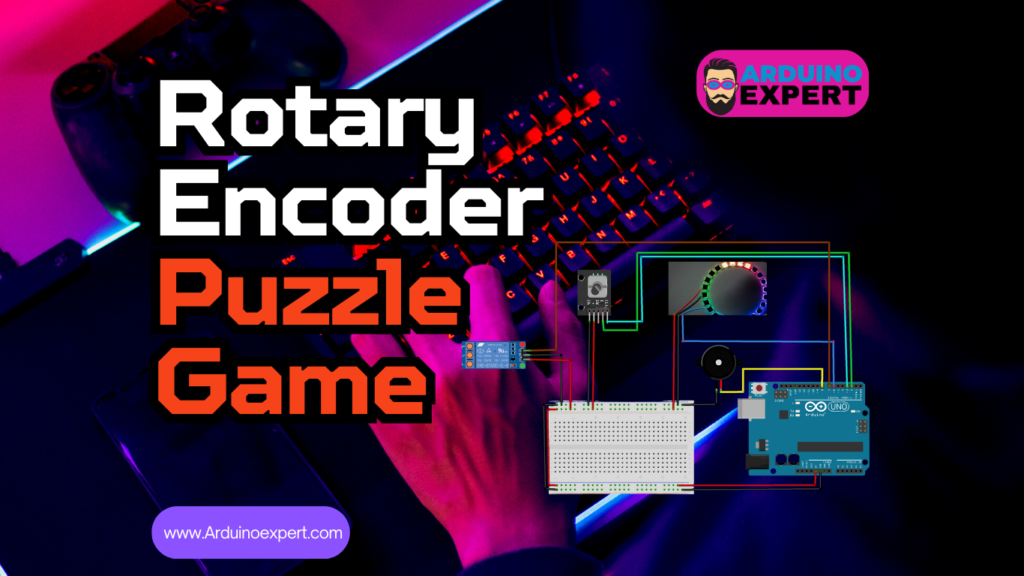
Project Overview Rotary Encoder NeoPixel Puzzle Game Using Arduino
SpinCode is a skill-based logic puzzle game where the player must rotate a rotary encoder in a predefined sequence. The system continuously validates the user’s input and provides instant visual and audio feedback.
When the correct sequence is completed:
- The NeoPixel LED ring confirms success visually
- A winning melody is played
- A relay output is activated, enabling real-world interaction such as unlocking a door or triggering a mechanism
Any incorrect move immediately resets the game and plays a failure sound, making the experience challenging and engaging.
Components Used in Custom Arduino Puzzle Game Project
- Arduino UNO / Nano / Pro Mini
- Rotary Encoder
- NeoPixel LED Ring (WS2812B)
- Relay Module
- Buzzer (Active or Passive)
- Power Supply (5V)
- Resistors and Wiring

How the Rotary Encoder NeoPixel Puzzle Game Works?
Game Logic Flow
- The player rotates the rotary encoder clockwise or counterclockwise
- Each rotation updates an internal counter
- Arduino compares the movement with a predefined correct sequence
- For every correct step:
- One NeoPixel LED lights up on the ring
- If the player:
- Rotates in the wrong direction
- Overshoots the expected count
→ The game resets and plays a losing tone
- When all steps are completed correctly:
- The relay is activated
- A winning sound is played
- LEDs visually confirm success
- System resets after a short delay
This combination of logic validation + instant feedback creates a satisfying and intuitive user experience.
Detailed System Explanation
1. Arduino Board – Central Controller
The Arduino acts as the brain of the system, managing:
- Rotary encoder input decoding
- Game state logic
- NeoPixel LED animations
- Sound output via buzzer
- Relay activation
Any Arduino with sufficient GPIO pins (UNO, Nano, Pro Mini) can be used, making the design flexible for different product form factors.
2. NeoPixel LED Ring (WS2812B)
The NeoPixel LED ring provides the primary visual interface.
Functions:
- Displays progress as LEDs light up sequentially
- Turns off all LEDs during failure
- Confirms success with full illumination or color animation
Why NeoPixels?
- Individually addressable LEDs
- Single data pin control
- Smooth color transitions
- Highly attractive for user-facing products
This makes SpinCode ideal for interactive product design.
3. Rotary Encoder – User Input Interface
The rotary encoder is the core interaction device.
Capabilities:
- Detects clockwise and counterclockwise rotation
- Converts mechanical movement into digital pulses
- Enables precise, skill-based user input
Using a rotary encoder instead of buttons significantly increases engagement and difficulty, making the puzzle more rewarding.
4. Relay Module – Real-World Action
The relay bridges the digital game with the physical world.
Relay Activation Use Cases:
- Unlocking doors or boxes
- Enabling motors or solenoids
- Triggering external systems
The relay activates only when the full sequence is completed correctly, making it suitable for security and access control applications.
5. Buzzer / Beeper – Audio Feedback
Audio feedback enhances usability and immersion.
Sounds Implemented:
- Winning melody on success
- Losing tone on incorrect input
This ensures the player immediately understands the result of their action without needing instructions.
6. Power Supply Considerations
The system can be powered via:
- USB connection
- External regulated 5V supply
Adequate current capacity is required, especially for NeoPixel LEDs, which is an important consideration in professional product design.
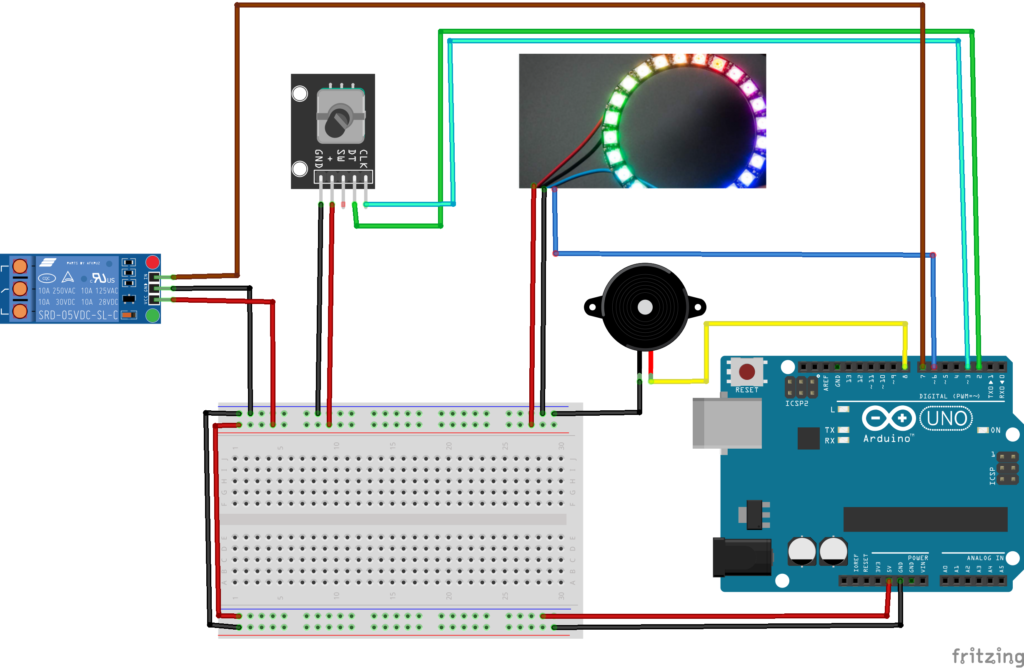
Circuit Diagram of Rotary Encoder and NeoPixel with Arduino
Code for Arduino Rotary Encoder Puzzle Game
#include <Adafruit_NeoPixel.h>
#ifdef __AVR__
#include <avr/power.h>  // Required for 16 MHz Adafruit Trinket
#endif

#define PIN_NEO_PIXEL 6  // Arduino pin that connects to NeoPixel
#define NUM_PIXELS 16    // The number of LEDs (pixels) on NeoPixel

Adafruit_NeoPixel NeoPixel(NUM_PIXELS, PIN_NEO_PIXEL, NEO_GRB + NEO_KHZ800);


#define RELAY_PIN 7
#define BEEPER_PIN 8
#define ENCODER_CLK 2
#define ENCODER_DT  3
int k = 0;

int encoderPos = 0;
int lastEncoded = 0;

void setup() {
 // Serial.begin(9600);
  pinMode(RELAY_PIN, OUTPUT);
  pinMode(BEEPER_PIN, OUTPUT);
  NeoPixel.begin();
  NeoPixel.clear();
  NeoPixel.show(); // Initialize all pixels to 'off'
  pinMode(ENCODER_CLK, INPUT);
  pinMode(ENCODER_DT, INPUT);
  digitalWrite(RELAY_PIN,LOW); // Turn OFF Relay Pin Initially
}

int correctSequence[] = {3, -3, 3, -3, 3, -3, 3, -3};
int index = 0;
int last_k;
int flag = 1;
int last_index;
int success;
int j,l,t;
Applications of NeoPixel Logic Puzzle Using Arduino
SpinCode is suitable for a wide range of real-world applications:
- Escape room puzzle modules
- Electronic lock systems
- Smart safes and access control
- Interactive museum exhibits
- STEM education kits
- Arduino portfolio demonstrations
- Skill-based arcade or exhibition games
If you want to make a similar game project with Arduino please check our Racing Cars Game Project.
Future Enhancements & Scalability
SpinCode can be expanded in multiple ways:
- Multiple Difficulty Levels
- Adjustable sequence length
- Faster response requirements
- Color-Based Sequences
- Different colors for each step
- Memory-based challenges
- Display Integration
- OLED or LCD for hints and timers
- EEPROM-Based Storage
- Save and reprogram sequences without code changes
- Wireless Connectivity
- Bluetooth or Wi-Fi (ESP32) integration
- Timer-Based Gameplay
- Countdown timers and time-based failure
- Advanced Sound Effects
- DFPlayer Mini integration
Conclusion
SpinCode – Rotary Encoder NeoPixel Puzzle Game Using Arduino is a compact yet powerful demonstration of interactive embedded system design. It seamlessly integrates user input, logic processing, visual feedback, sound effects, and physical actuation into a single cohesive product.
Developed as a client project, SpinCode highlights our expertise in Arduino Projects, Product Design, and Arduino Project Services, making it ideal for both educational and commercial applications.
Need Help Assistance in Game Project?
If you need this Puzzle Game Project with or without Modifications or Customization then you can contact us through WhatsApp. We can deliver you this Project in the Following Ways.
Project Code:
we can provide you Project Code along with Zoom Assistant, through Zoom meeting for Setup of this Project or any other Arduino Project of your need.
Fully Functional Project with Hardware/Components Shipment:
if you can not make this project yourself then you can use this option. We will assemble the Project and will ship it to your Doorstep with Safe Packaging.
Learn More about Services we Offer.
Are you looking for another Game project with please visit our project “Pinball Game Using Arduino“.