Heart rate monitoring has become a core feature in modern smart devices, health-tracking wearables, and fitness monitoring systems. From smartwatches to sports trackers, the ability to measure and visualize cardiovascular activity in real time is an essential part of today’s Product Design and Development. In this project, we create an elegant, compact, and visually engaging Heart Rate Display System using Adafruit FLORA, a Pulse Sensor, and NeoPixel LEDs, demonstrating how bio-signals can be translated into meaningful visual feedback.
Using the Arduino Programming Language, the system reads heartbeats through an analog pulse sensor connected to the microcontroller. The pulse sensor detects changes in blood flow, allowing the Adafruit FLORA Microcontroller to calculate the user’s BPM (beats per minute). This BPM data is then interpreted and mapped to different heart-rate zones such as resting, normal, elevated, and high-intensity states.

The uniqueness of this project lies in its creative use of NeoPixel LEDs, which serve as the visual output. NeoPixels provide bright, individually addressable RGB colors, making them ideal for displaying biometric data. Instead of traditional numeric output, each heart rate zone is represented by a color:
- Blue → Low/Resting
- Green → Normal
- Orange → Elevated
- Red → High/Warning
This intuitive color coding transforms heart rate data into an easy-to-understand visual interface, similar to what is used in consumer smartwatches and fitness trackers.
The system updates continuously and instantly, giving real-time biofeedback. By combining a pulse sensor, Arduino, and NeoPixel LEDs, this project represents the fundamentals of smart health monitoring, embedded product development, and interactive human-centered design. It is an excellent stepping stone for students, makers, and developers working on smart medical devices or wearable technology projects.
Hardware Used Smart Heart Rate Display Project
- Adafruit Flora / any microcontroller
- Pulse Sensor
- Adafruit NeoPixel LEDs
- Jumper wires
- Power supply (5V)
What is Adafruit FLORA Board?
Adafruit FLORA is a powerful, wearable-focused microcontroller board designed specifically for smart textiles, wearable electronics, and compact embedded systems. It is built around the Atmega32u4 microcontroller (the same chip used in Arduino Leonardo), offering USB support, easy programming, and compact size. FLORA is part of Adafruit’s wearable ecosystem and is highly compatible with sewable electronics such as conductive thread, NeoPixels, sensors, and flexible cables.

Why Adafruit FLORA Is Used in Smart Heart Rate Display Project
Your project benefits enormously from using Adafruit FLORA. Here’s why:
1. Perfect for Wearable Heart Rate Monitors
Heart rate monitors are typically worn on:
- Wrist
- Arm
- Chest
- Clothing
FLORA’s small, circular design makes it ideal for attaching to fabric or wearable straps—far more comfortable than a rectangular Arduino board.
2. Seamless NeoPixel LED Control
Your project uses NeoPixel LEDs to display heart rate zones using colors.
FLORA provides:
- Clean timing for NeoPixel data signals
- Stable voltage for multiple LEDs
- High compatibility with Adafruit NeoPixel library
This results in smooth, flicker-free LED animation.
3. Easy Sensor Integration
The PulseSensor connects directly to FLORA with:
- Analog input support
- Stable voltage regulation
- Clean signal handling
This ensures accurate BPM readings, which are essential in a health-monitoring Smart Device.
4. Lightweight and Ideal for Wearable Prototypes
Because this project involves real-time heart rate monitoring, it may be attached to:
- The wrist
- A finger clip
- A fitness band
- Clothing
FLORA’s low weight and compact build make it much more suitable than an Arduino UNO.
5. USB Programmable and Battery Friendly
FLORA supports:
- USB charging
- 3.7V LiPo batteries
- Power-efficient operation
This matches the needs of portable health monitoring systems.
6. Designed for Smart Devices
Your “Heart Rate Display with NeoPixel” behaves just like commercial smart fitness gadgets.
FLORA is built specifically for:
- Smart textiles
- Body-worn devices
- Interactive LED wearables
- Health and fitness prototypes
Using FLORA elevates your project into the category of Smart Device Engineering and professional wearable product design.
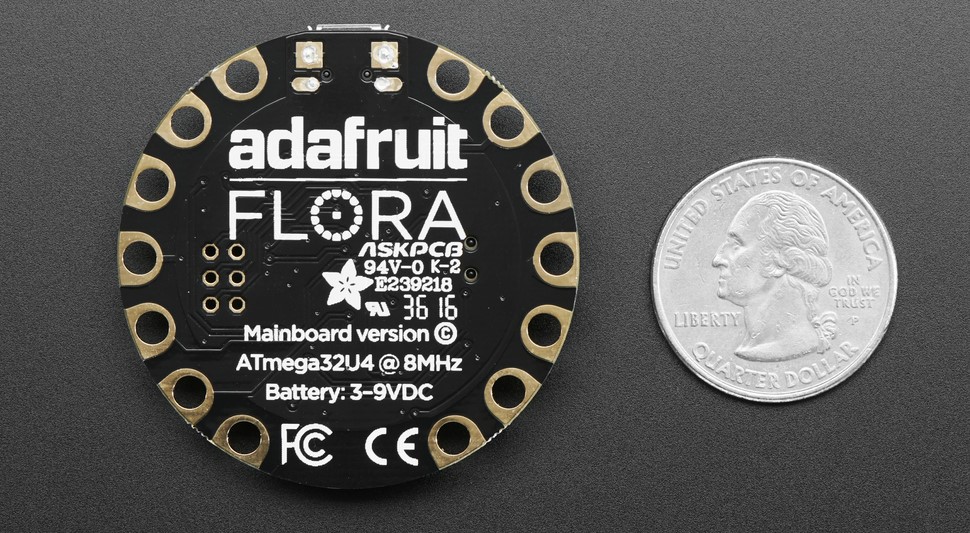
Key Features of the Smart Heart Rate Display Project
1. Real-Time Heart Rate Monitoring
The system continuously reads and processes heartbeat data.
2. Visual Feedback Using NeoPixels
An attractive and clear method of indicating heart rate zones using color-coded LEDs.
3. Compact & Wearable Design
Using Adafruit Flora makes this system suitable for wearable health devices.
4. Easy-to-Understand Interface
Color changes instantly show user heart condition:
- Blue → Low
- Green → Normal
- Orange → Elevated
- Red → High
5. Uses Arduino Programming Language
Beginner-friendly code structure using popular libraries.
6. Ideal for Product Design and Development
Demonstrates core principles used in:
- Fitness bands
- Smart watches
- Medical monitoring devices
- IoT health systems
7. Expandable Smart Device
You can add:
- OLED display
- Bluetooth app
- Data logging
- Alarms for abnormal heart rate
Flowchart Smart Heart Rate Display Project
          ┌────────────────────────┐
          │       Start System      │
          └─────────────┬──────────┘
                        │
                        ▼
          ┌────────────────────────┐
          │ Initialize NeoPixels    │
          │ Initialize PulseSensor  │
          └─────────────┬──────────┘
                        │
                        ▼
          ┌────────────────────────┐
          │ Read Pulse Sensor Value │
          └─────────────┬──────────┘
                        │
                        ▼
          ┌────────────────────────┐
          │ Calculate BPM           │
          └─────────────┬──────────┘
                        │
                        ▼
          ┌───────────────────────────────┐
          │ Compare BPM Against Thresholds │
          └────────────────┬──────────────┘
                           │
                           ▼
    ┌────────────────────────────────────────────────┐
    │ Set LED Color:                                │
    │  <60 BPM → Blue                               │
    │  60–90 BPM → Green                            │
    │  90–120 BPM → Orange                          │
    │  >120 BPM → Red                               │
    └────────────────────────────────────────────────┘
                           │
                           ▼
          ┌────────────────────────┐
          │ Update NeoPixel Output  │
          └─────────────┬──────────┘
                        │
                        ▼
          ┌────────────────────────┐
          │ Repeat Continuously     │
          └────────────────────────┘
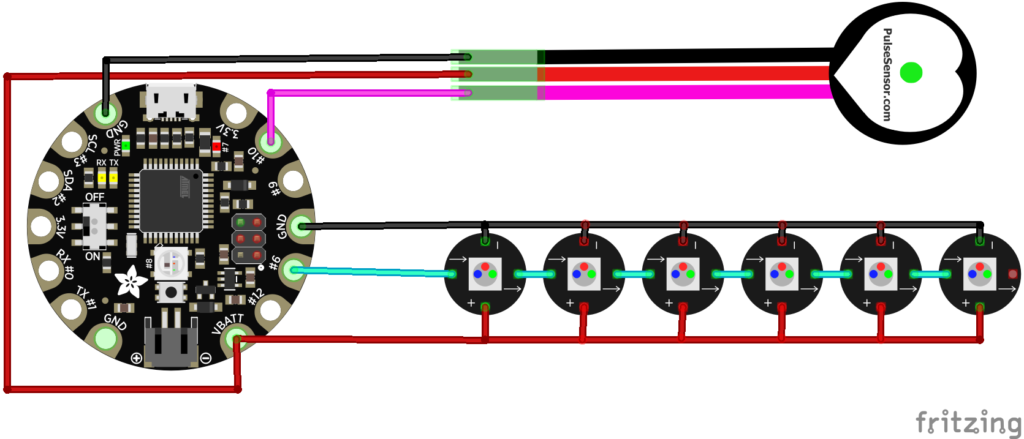
Circuit Diagram of the Smart Heart Rate Display System With Adafruit FLORA
Adafruit FLORA Code for Smart Heart Rate Display System
#include <Adafruit_NeoPixel.h>
#include <PulseSensorPlayground.h>

#define PIN_PIXELS 6    // Define the pin where NeoPixels are connected
#define PIN_PULSE A10    // Define the pin where Pulsesensor is connected

#define PIXEL_COUNT 6   // Number of NeoPixels

Adafruit_NeoPixel pixels = Adafruit_NeoPixel(PIXEL_COUNT, PIN_PIXELS, NEO_GRB + NEO_KHZ800);

PulseSensorPlayground pulseSensor;

void setup() {
  pixels.begin();
  pixels.show();  // Initialize all pixels to 'off'

  pulseSensor.begin(); // Initialize the PulseSensor

  Serial.begin(9600);
}

void loop() {
  int heartRate = pulseSensor.getBeatsPerMinute();

  if (heartRate < 113) {
    setPixelColor(255, 255, 255);  // White light
  } else if (heartRate >= 114 && heartRate <= 132) {
    setPixelColor(0, 255, 0);  // Green
  } else if (heartRate >= 133 && heartRate <= 151) {
    setPixelColor(255, 255, 0);  // Yellow
  } else if (heartRate >= 152 && heartRate <= 169) {
    setPixelColor(255, 165, 0);  // Orange
  } else {
    setPixelColor(255, 0, 0);  // Red
  }

  delay(100);  // Adjust the delay as needed
}

void setPixelColor(uint8_t red, uint8_t green, uint8_t blue) {
  for (int i = 0; i < PIXEL_COUNT; i++) {
    pixels.setPixelColor(i, pixels.Color(red, green, blue));
  }
  pixels.show();
}
Applications of the Smart Heart Rate Display System
1. Fitness Monitoring
Used for exercise routines, workout tracking, and real-time intensity monitoring.
2. Medical and Health Devices
Can be adapted for patient monitoring, wellness gadgets, and rehabilitation tools.
3. Smart Wearable Prototyping
Base concept for smart watches, heart bands, and IoT health trackers.
4. Educational Projects
Ideal for learning:
- Sensors and signals
- Arduino programming
- Human physiology
- Smart Device development
5. Research and Development
Great for experimenting with bio-signal processing and interactive physical computing.
Conclusion
The Heart Rate Display with Adafruit FLORA and NeoPixel project successfully demonstrates how biometric data can be measured, processed, and visually represented in real time using accessible components and the Arduino Programming Language. By integrating a pulse sensor with NeoPixel LEDs, the system provides an intuitive and attractive color-coded display of the user’s heart rate zones. This makes the device not only functional but also user-friendly and visually appealing.
This system can serve as the foundation for more advanced smart devices such as fitness wearables, IoT-enabled health monitors, or medical alert systems. With simple additions—such as Bluetooth connectivity, OLED displays, or data logging—the project can evolve into a complete, professional-grade health monitoring platform.
Need Help/Assistance in Smart Heart Rate Display System Project?
If you need any help or assistance in Smart Heart Rate Display Project with or without Modifications/Customization then you can contact us through WhatsApp.
Learn More about the services we offer