Stepper motor control is a critical requirement in many industrial automation, CNC machines, robotics, and motion control systems. In professional Product Design and Development Services, reliable and precise motor control plays a key role in ensuring system accuracy and long-term performance.
In this project blog, we demonstrate how to control a high-torque NEMA 23 stepper motor using an Arduino UNO and a DM542 (DM543 compatible) stepper motor driver, with push buttons used to control motor direction. This project was developed for a client as part of our Arduino Project Services, focusing on a simple, robust, and user-friendly motor control solution.
The project highlights real-world implementation of:
- Industrial stepper motor drivers
- Safe Arduino-to-driver interfacing
- Manual motor direction control using push buttons
- Scalable design suitable for commercial products

Project Overview | NEMA23 Stepper Motor Control with DM542
The Arduino-based NEMA 23 stepper motor controller uses push buttons as human-machine interface (HMI) elements to control the direction of rotation of the stepper motor.
The Arduino generates:
- STEP pulses to control motor speed
- DIR signals to control rotation direction
These signals are fed to the DM542 stepper motor driver, which safely handles the high current and voltage required by the NEMA 23 motor.
This architecture is widely used in:
- CNC controllers
- Industrial positioning systems
- Automated manufacturing equipment

If you want to explore our IoT, Stepper Motors Control Project using ESP32 and Smartphone App, then please Click Here.
Components Used in Stepper Motor Control Project
- Arduino UNO
- NEMA 23 Stepper Motor
- DM542 / DM543 Stepper Motor Driver
- Push Buttons (Direction Control)
- External DC Power Supply
- Connecting Wires
- Breadboard / Terminal Blocks
Working Principle of NEMA23 Stepper Motor Control Project
1. Arduino as Control Unit
The Arduino UNO acts as the main controller. It reads the state of two push buttons:
- Forward Direction Button
- Reverse Direction Button
Based on the button pressed:
- Arduino sets the DIR pin HIGH or LOW
- Generates continuous STEP pulses to rotate the motor
2. DM542 Stepper Motor Driver
The DM542 (DM543 compatible) driver is an industrial-grade microstepping driver designed for NEMA 23 motors.
Key responsibilities:
- Converts STEP and DIR signals into precise motor movements
- Handles high current safely
- Provides microstepping for smooth motion
- Electrically isolates Arduino from motor power section
3. Push Button Direction Control
Two push buttons are connected to Arduino digital pins using internal pull-up resistors.
- Button 1 Pressed → Clockwise Rotation
- Button 2 Pressed → Counter-Clockwise Rotation
We can also use Single Button to control Direction
This simple control logic makes the system:
- Easy to operate
- Ideal for testing, demos, and industrial panels
- Reliable for continuous operation
4. Power Supply Architecture
- Arduino UNO: Powered by 5V (USB or regulated supply)
- DM542 Driver: Powered by an external DC power supply (typically 24V–48V)
- Stepper Motor: Powered directly through the driver
This separation ensures electrical safety and system stability, a key requirement in professional product design.
Key Features of the Project
- High-torque NEMA 23 stepper motor control
- Industrial-grade DM542 stepper driver
- Push button-based manual direction control
- Smooth and accurate motor movement
- Electrically isolated control signals
- Expandable design for speed control or automation
- Suitable for commercial and industrial products
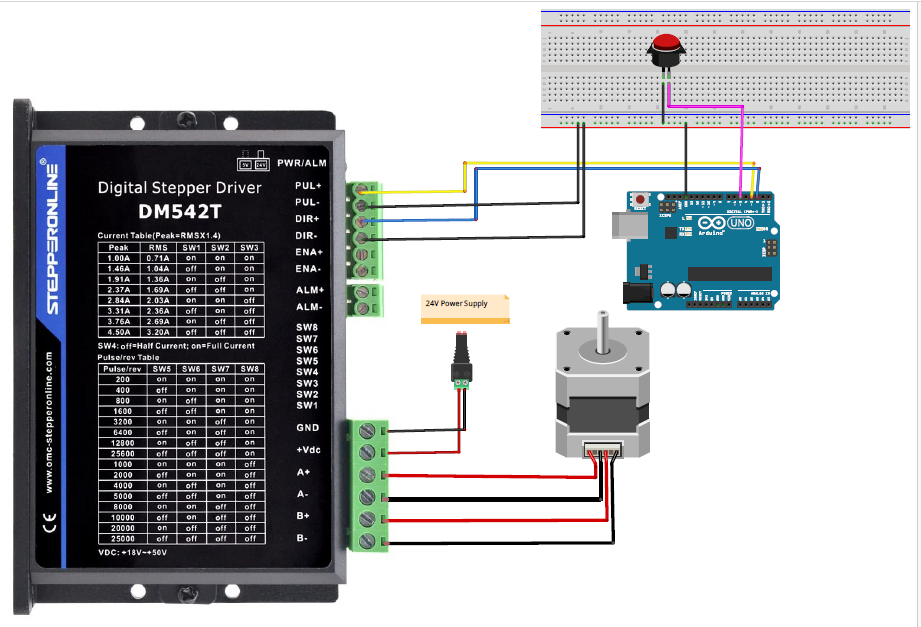
Circuit Diagram of Arduino with DM542, Stepper Motor and Button
Arduino Code for DM542 Stepper Driver Arduino Interface
const int stepPin = 3;    // Step pin on the DM542 driver
const int dirPin = 2;     // Direction pin on the DM542 driver
const int buttonPin = 5;  // Connect the push button to this pin

bool isClockwise = true;  // Flag to track motor direction

void setup() {

  pinMode(stepPin, OUTPUT);
  pinMode(dirPin, OUTPUT);
  pinMode(buttonPin, INPUT_PULLUP);
  digitalWrite(dirPin, LOW);
  digitalWrite(stepPin, LOW);
  while (digitalRead(buttonPin)==HIGH) ;
}

void loop() {

  if (digitalRead(buttonPin) == LOW) {

    isClockwise = !isClockwise;
    digitalWrite(dirPin, isClockwise ? HIGH : LOW);

    delay(250);
  }
  stepMotor();


}

// Function to step the motor
void stepMotor() {
  digitalWrite(stepPin, HIGH);
  delayMicroseconds(1071);
  digitalWrite(stepPin, LOW);
  delayMicroseconds(1071);
}
Working Video Arduino DM542 Stepper Motor Control
Applications of Arduino NEMA 23 Stepper Motor Control Project
This Arduino-based stepper motor control system is ideal for:
- CNC machines and engravers
- Automated sliding mechanisms
- Industrial positioning systems
- Robotics and robotic arms
- Linear actuators
- Conveyor belt direction control
- Educational and training kits
- Custom industrial product prototypes
Here you can Check in this our project how we Control Steam Valve with Arduino and Stepper Motor.
Scalability & Future Enhancements
This system can be easily upgraded to include:
- Speed control using potentiometer
- LCD or Nextion display for RPM & direction
- Limit switches for end-stop protection
- Encoder feedback for closed-loop control
- IoT integration (Wi-Fi / Bluetooth)
- CNC GRBL compatibility
Conclusion
The NEMA 23 Stepper Motor Control using Arduino UNO and DM542 Driver is a practical, reliable, and industry-relevant solution developed as part of our Arduino Project Services. By using push buttons for direction control, the project achieves simplicity without compromising performance.
This design reflects professional Product Design and Development practices, making it ideal for industrial automation, custom machinery, and client-specific applications.
If you are looking for custom Arduino development, motor control solutions, or embedded product design, this project represents the quality and approach we follow in our services.
Need Help in Stepper Motor Project?
If you need this Project with or without Modifications or Customization then you can contact us through WhatsApp.
We can provide you Project Code along with Zoom Assistant, through Zoom meeting for Setup of this Project or any other Arduino Project of your need.
We can also ship Fully Functional Project with Hardware/Components.
Learn More about the Services we offer?