Controlling multiple stepper motors is a core requirement in industrial automation, CNC machines, robotics, and custom electromechanical products. In professional Arduino Project Services, clients often request synchronized or independent control of multiple motors using reliable drivers such as the TB6600 stepper motor driver.
In this guide blog, we explain how to control multiple stepper motors using Arduino, focusing on a two-motor implementation driven by TB6600 drivers. The project demonstrates:
- STEP & DIR based motor control
- Speed variation using a potentiometer
- Simultaneous multi-motor operation
- Clean and scalable Arduino code architecture
Also Check: Learn How to use Multiple DS18B20 Temperature Sensors with Arduino

Project Overview || Multiple Stepper Motors Control
This Arduino-based project controls two stepper motors simultaneously using:
- Arduino digital pins for STEP and DIR
- TB6600 stepper motor drivers
- A potentiometer to dynamically adjust speed
The same logic can be easily scaled to 3, 4, or more stepper motors, which makes this project suitable for commercial product design and industrial applications.
Components Required for Multiple Stepper Motors Control Using Arduino & TB6600
To build a reliable and scalable multiple stepper motor control system, the following hardware components are required. These components are commonly used in professional Arduino Projects and Arduino Project Services for automation, CNC, and motion control applications.
1. Arduino Board (UNO)
The Arduino board acts as the main control unit of the system.
Role in the Project:
- Generates STEP and DIR signals
- Reads analog input from potentiometer
- Controls multiple TB6600 drivers simultaneously
Recommended Options:
- Arduino UNO – ideal for 2–4 stepper motors
- Arduino Mega – recommended for larger multi-axis systems
Widely used in industrial Arduino product development
2. TB6600 Stepper Motor Driver (One per Motor)
Each stepper motor requires one dedicated TB6600 driver.
Function:
- Converts Arduino logic signals into motor movement
- Handles high current and voltage safely
- Provides microstepping and smooth motion control
Why TB6600:
- Industrial-grade reliability
- STEP/DIR interface
- Supports NEMA 17 & NEMA 23 motors
Ideal for Arduino automation and CNC projects
3. Stepper Motors (NEMA 17 / NEMA 23)
Stepper motors are the primary actuators in the system.
Common Choices:
- NEMA 17 – light-duty applications
- NEMA 23 – high-torque industrial applications
Applications:
- CNC machines
- Linear motion systems
- Robotics
Recommended Project: How to Use 28byj48 Stepper Motor with Arduino
4. DC Power Supply (Motor Power)
An external power supply is required for the TB6600 drivers.
Typical Specifications:
- Voltage: 12V – 36V DC (based on motor rating)
- Current: Sufficient to drive all motors simultaneously
The Arduino should not power the motors directly.
5. Potentiometer (Speed Control)
A potentiometer is used for real-time speed control.
Purpose:
- Adjusts motor speed dynamically
- Sends analog input to Arduino
- Makes the system user-friendly and interactive
Common Value:
- 10kΩ linear potentiometer
6. Connecting Wires & Jumper Cables
Required for:
- Arduino to TB6600 signal connections
- Power supply wiring
- Potentiometer and motor connections
Use good-quality wires for noise-free operation in professional builds.
7. Breadboard or Terminal Blocks
Used for:
- Signal distribution
- Clean wiring
- Easy testing and troubleshooting
For commercial or client products, terminal blocks are preferred.
8. Common Ground Connection
A shared ground between:
- Arduino
- TB6600 drivers
This is mandatory for correct STEP/DIR signal interpretation.
TB6600 Stepper Motor Driver – Detailed Overview
The TB6600 stepper motor driver is a high-performance, industrial-grade driver module widely used in Arduino projects, CNC machines, robotics, and automation systems. In this project, the TB6600 plays a critical role by safely and efficiently driving multiple stepper motors under Arduino control.
Unlike small onboard motor drivers, the TB6600 is designed to handle high current and high voltage, making it ideal for professional product design and Arduino Project Services where reliability and precision are essential.
Key Functions of the TB6600 Driver
The TB6600 driver acts as an interface between the Arduino and the stepper motor. Its main responsibilities include:
- Converting low-power STEP and DIR signals from Arduino into precise motor movement
- Handling high motor current without overloading the microcontroller
- Providing microstepping control for smoother and more accurate rotation
- Electrically isolating the Arduino logic side from the motor power stage
This separation is crucial in industrial and client-based Arduino projects, where electrical safety and system stability are top priorities.
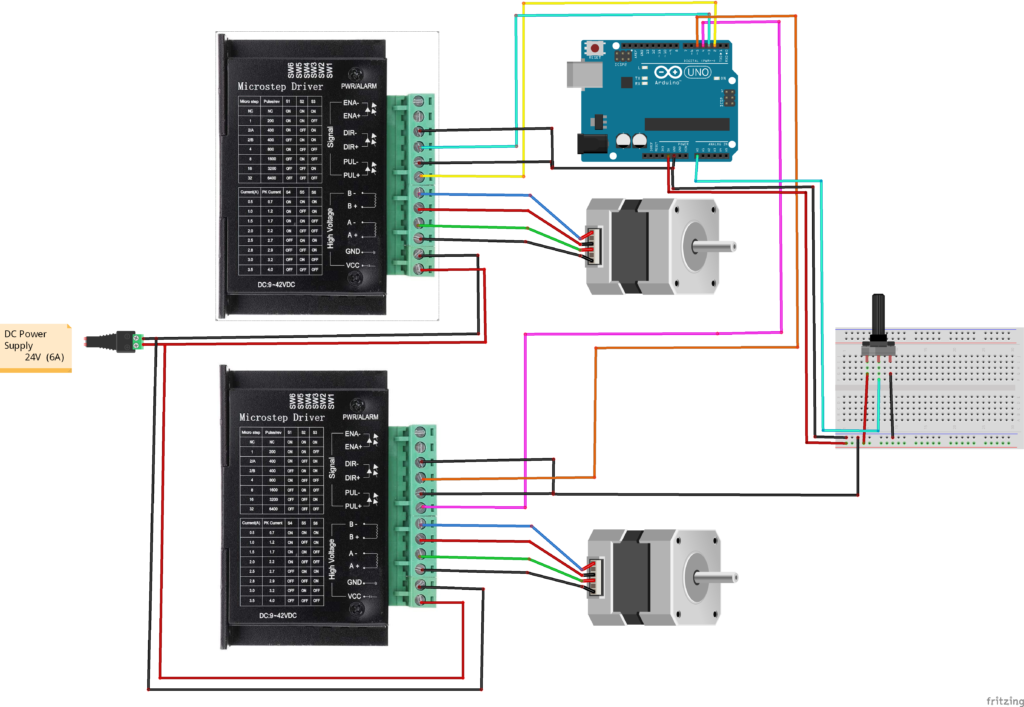
Circuit Diagram of Multiple Stepper Motors with Arduino and TB6600
Arduino Code for Multiple Stepper Motors and TB6600
#define dirPin1 3
#define stepPin1 2

#define dirPin2 5
#define stepPin2 4

#define potPin A0

int del =500;
int prvPotVal=0;
int potVal;

void setup() {
  // Declare pins as output:
  pinMode(stepPin1, OUTPUT);
  pinMode(dirPin1, OUTPUT);
    pinMode(stepPin2, OUTPUT);
  pinMode(dirPin2, OUTPUT);

  // Set the spinning direction CW/CCW:
  digitalWrite(dirPin1, HIGH);
   digitalWrite(dirPin2, HIGH);
}

void loop() {
   potVal=analogRead(potPin);
potVal= map(potVal,0,1023,0,100);


if (potVal!=prvPotVal){
 del= random (100,1500);

prvPotVal=potVal;
}
stepperMoter1(del);
stepperMoter2(del);
}

void stepperMoter1(int del)
{  // These four lines result in 1 step:
  digitalWrite(stepPin1, HIGH);
  delayMicroseconds(del);
  digitalWrite(stepPin1, LOW);
  delayMicroseconds(del);}

  void stepperMoter2(int del)
{  // These four lines result in 1 step:
  digitalWrite(stepPin2, HIGH);
  delayMicroseconds(del);
  digitalWrite(stepPin2, LOW);
  delayMicroseconds(del);}
Code Explanation
The Arduino code is designed to control multiple stepper motors simultaneously using TB6600 drivers by generating precise STEP and DIR pulses.
- The Arduino defines separate STEP and DIR pins for each stepper motor.
- A potentiometer connected to an analog pin is used to control the motor speed in real time.
- The analog value from the potentiometer is read and mapped to a delay value, which determines the step pulse timing.
- When the potentiometer value changes, the code updates the delay, resulting in a change in motor speed.
- The Arduino continuously generates HIGH–LOW pulses on the STEP pins for each motor.
- Both motors receive step pulses sequentially, allowing them to rotate at the same speed and direction.
- The DIR pins are set to a fixed state, defining the rotation direction of the motors.
This simple and efficient logic enables smooth, synchronized control of multiple stepper motors, making the code suitable for Arduino Projects, CNC systems, automation setups.
Applications of Dual Stepper Motor Control Project
This project is suitable for:
- CNC machines (X & Y axis control)
- Robotics and robotic arms
- Automated conveyor systems
- Pick-and-place machines
- Linear actuator control
- Industrial testing equipment
- Custom client automation solutions
Scalability & Future Enhancements
You can easily extend this project by:
- Adding independent speed control for each motor
- Introducing direction control using push buttons
- Using interrupts for better synchronization
- Migrating to AccelStepper library
- Integrating limit switches
- Adding LCD / Nextion display
- Using ESP32 for IoT motor control
Check Out: IoT, Stepper Motors Control using ESP32 and Smartphone App
Conclusion
The Multiple Stepper Motor Control using Arduino and TB6600 Driver project demonstrates a robust, flexible, and professional approach to motor control. By extracting full functionality from simple Arduino code, this guide shows how even basic logic can be transformed into industrial-ready solutions.
This project is an excellent example of Arduino Projects developed under professional Arduino Project Services, suitable for both learning and commercial deployment.
Need Help/Assistance for TB6600 Stepper Driver Arduino Project?
If you need any help or assistance in Arduino Multiple Stepper Motor Control Project with or without Modifications/Customization then you can contact us through WhatsApp.
Learn More about the services we offer